Your Hero Wars: Alliance assistant

PIUPIU is a Chrome extension that lives on the game page. It runs the Dungeon and the Eternal Frontier for you, with clicks or straight through the game server, does your daily chores, reads enemy war line-ups, forges hero gear and levels glyphs, skins and artifacts, and turns your guild's war battles into reports, MVP awards and a searchable battle archive. Add HWA Bot and you can drive it all from Telegram.

Chrome, Edge and other Chromium browsers. Eight languages: English, Deutsch, Français, 日本語, Русский, Українська, Tiếng Việt, العربية. Screenshots below are in English with sample data.

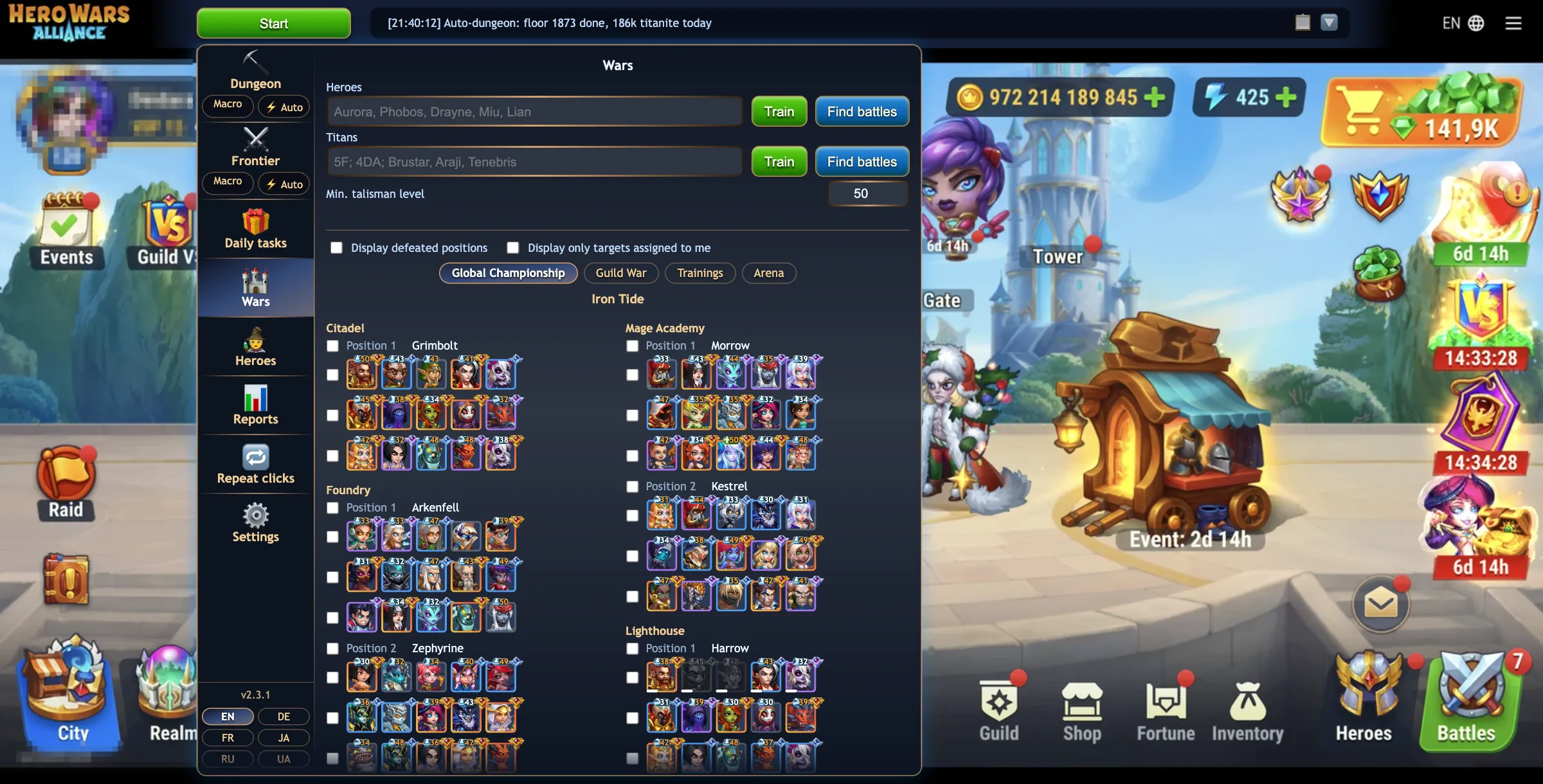
The game page with the PIUPIU toolbar above it and the control panel open on the Wars tab, listing the enemy Championship defence
A toolbar above the game and one panel with a tab per feature. The menu on the left of this page is the same menu.
1

PIUPIU in your browser

Runs only on hero-wars-alliance.com. It reads the game's own messages to know what is going on, and either clicks the real game canvas or talks to the game server the way the game itself does.

2

hwa-bot.dev for your guild

Guild leaders upload the war battles. Every member then gets reports, the MVP page and a battle search, in any browser.

3

HWA Bot on your computer

An optional tray app for Windows and macOS that links your own private Telegram bot to the extension. Start, stop and watch runs from your phone.

⛏️ Dungeon

The guild Dungeon, floor after floor

Two ways to run it, side by side in one tab: the Macro plays the screen with clicks like a player would, the ⚡ Auto fights through the game server in the background, with no clicks at all and much faster.

Basic & Full

Dungeon macro

Picks rooms, fights, collects the floor rewards and moves on, up to ten thousand floors in one run.

  • Drag the orbs to set the room priority: mixed, water, earth, fire.
  • Stop condition: a titan dies, HP below 10–50%, or never.
  • Dungeon shop: spend every titan soul coin on titan potions, every potion on horns of summoning, or give every horn to the fairies, in one press.
  • Delays tuner: one global multiplier plus every individual timing, with a reset to defaults.
  • End-of-run summary: floors, duration and page reloads grouped by reason.
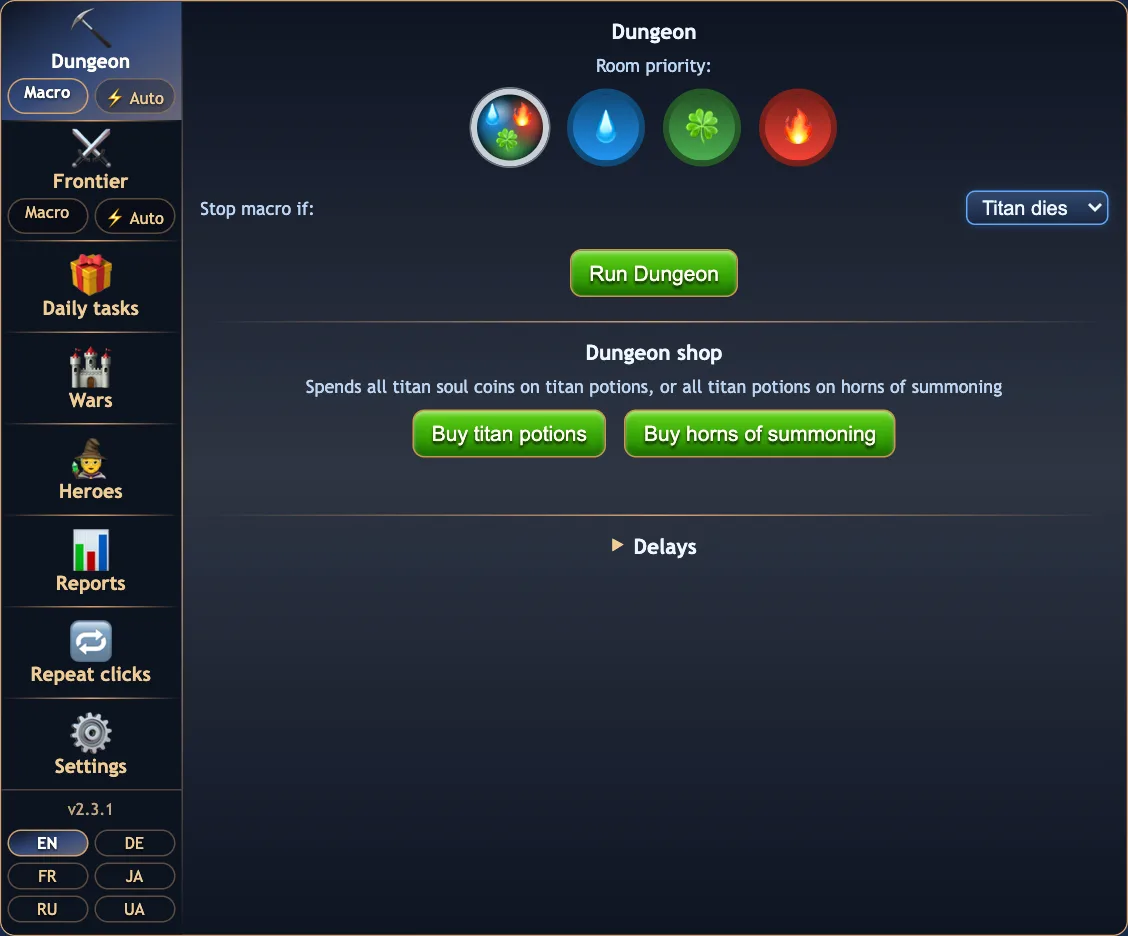
The Dungeon tab with the room priority orbs, the stop condition, the Run Dungeon button and the Dungeon shop
Dungeon, Macro: room priority, stop rule and the shop.
Basic & Full

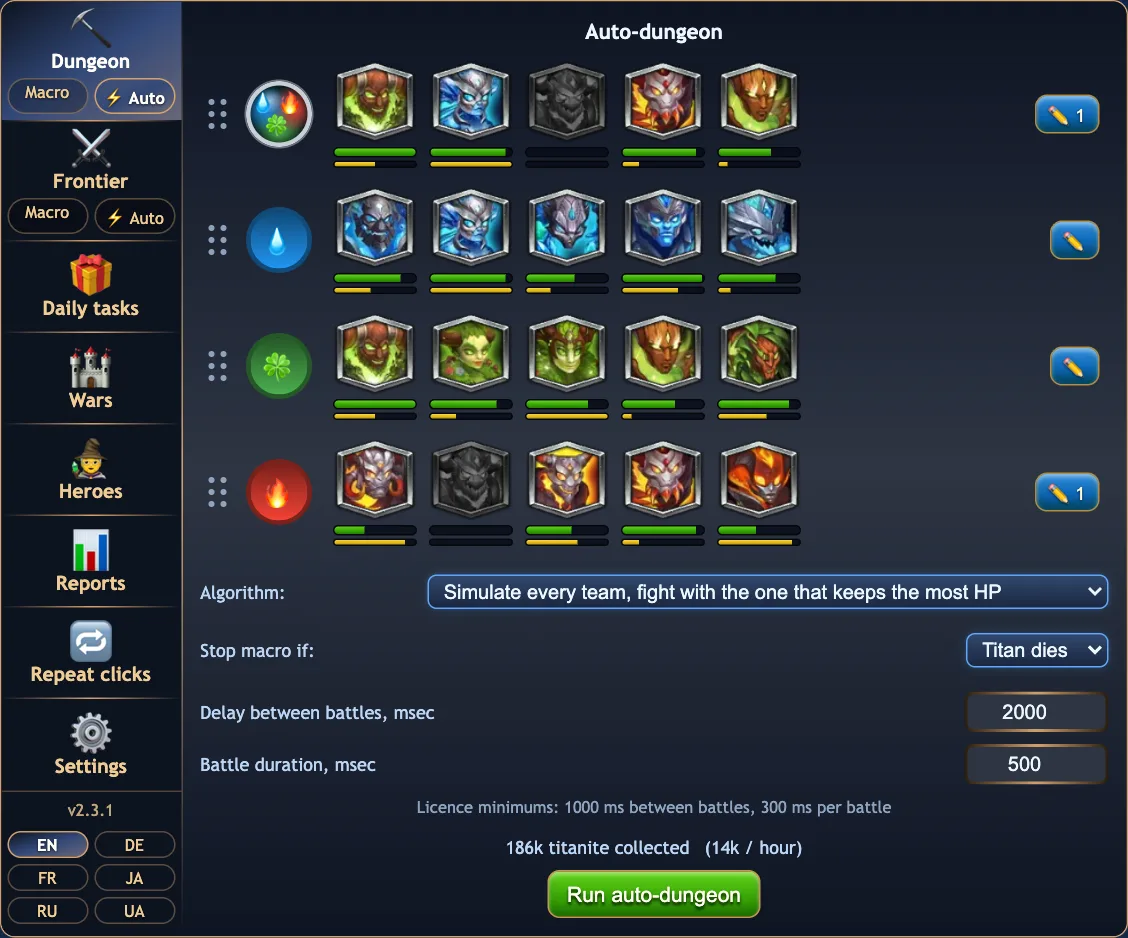
⚡ Auto-dungeon

The same Dungeon run through the game server: no screen to watch, only the tab has to stay open. Before each fight the game's own battle engine can play it out in your browser, so a titan that would die is never sent.

  • A board per room element: your five titans with live HP and energy bars. Drag the rows to change the room priority.
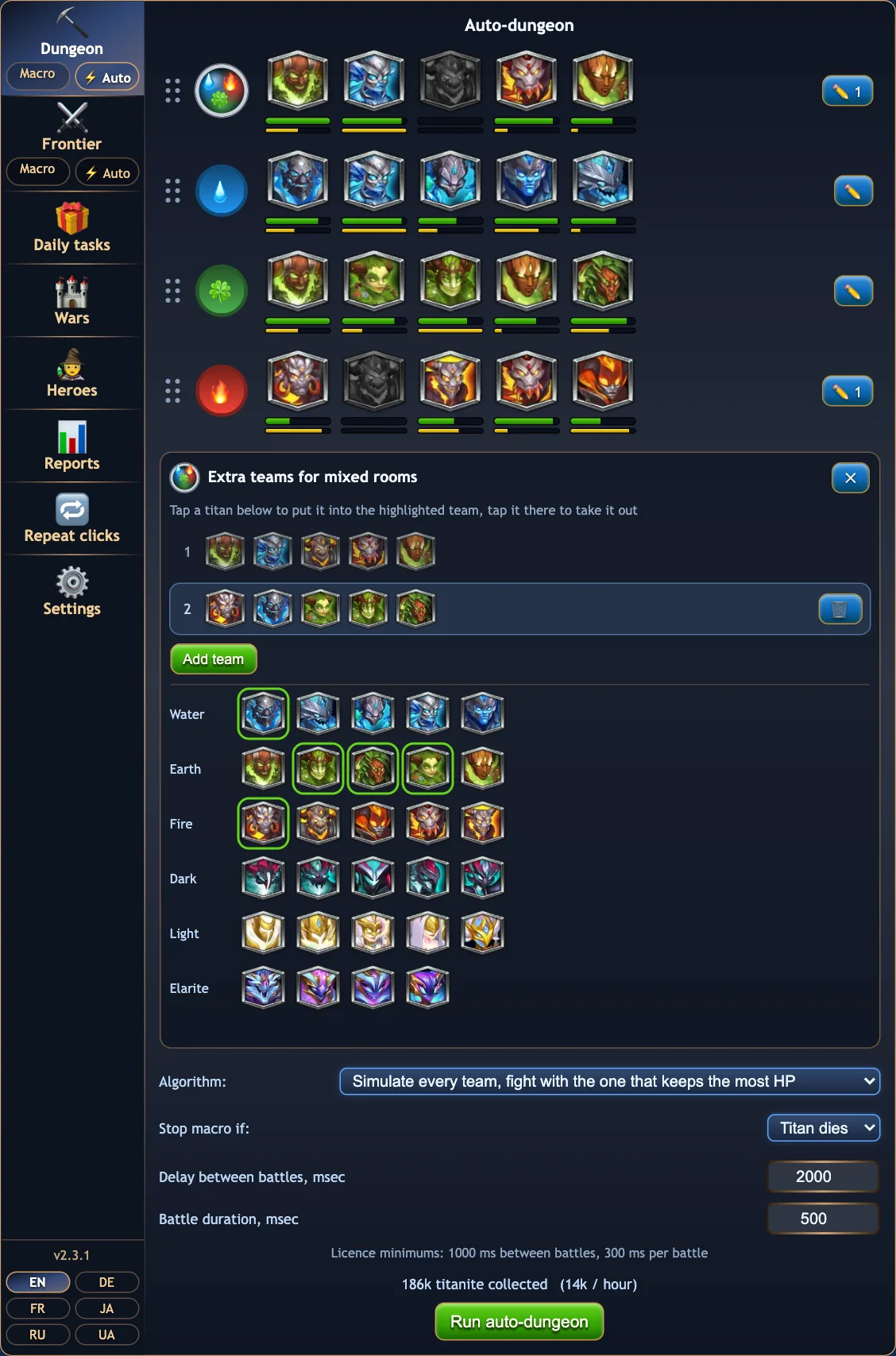
  • Extra teams per element with the ✏️ pencil: tap titans into team 2, 3 and so on, by faction.
  • Algorithm: keep the team, swap Angus and Moloch in mixed rooms by HP, simulate all teams and fight the battle with the most healing, or try the next team only when the stop rule catches the first.
  • Pacing: delay between battles and battle duration.
  • Titanite collected today and the expected rate per hour.
  • While it runs, a little dungeon on the panel shows the floor, the portal it picked and the result.
The Auto-dungeon tab: four room rows with titan portraits and HP bars, the algorithm select, pacing fields and titanite collected
Auto-dungeon: titans per room with HP and energy, 186k titanite today.
The extra teams editor for mixed rooms with a titan picker grouped by faction
Extra teams for mixed rooms, picked from your titans by faction.
⚔️ Frontier

Eternal Frontier, planned from real results

Every battle your teams fight is remembered. A planner uses that memory to decide which of your teams goes against which defender, and the Frontier runs level after level on its own, again as a click macro or ⚡ through the server.

Basic: 2000 levels a monthFull: unlimited

Frontier macro and planner

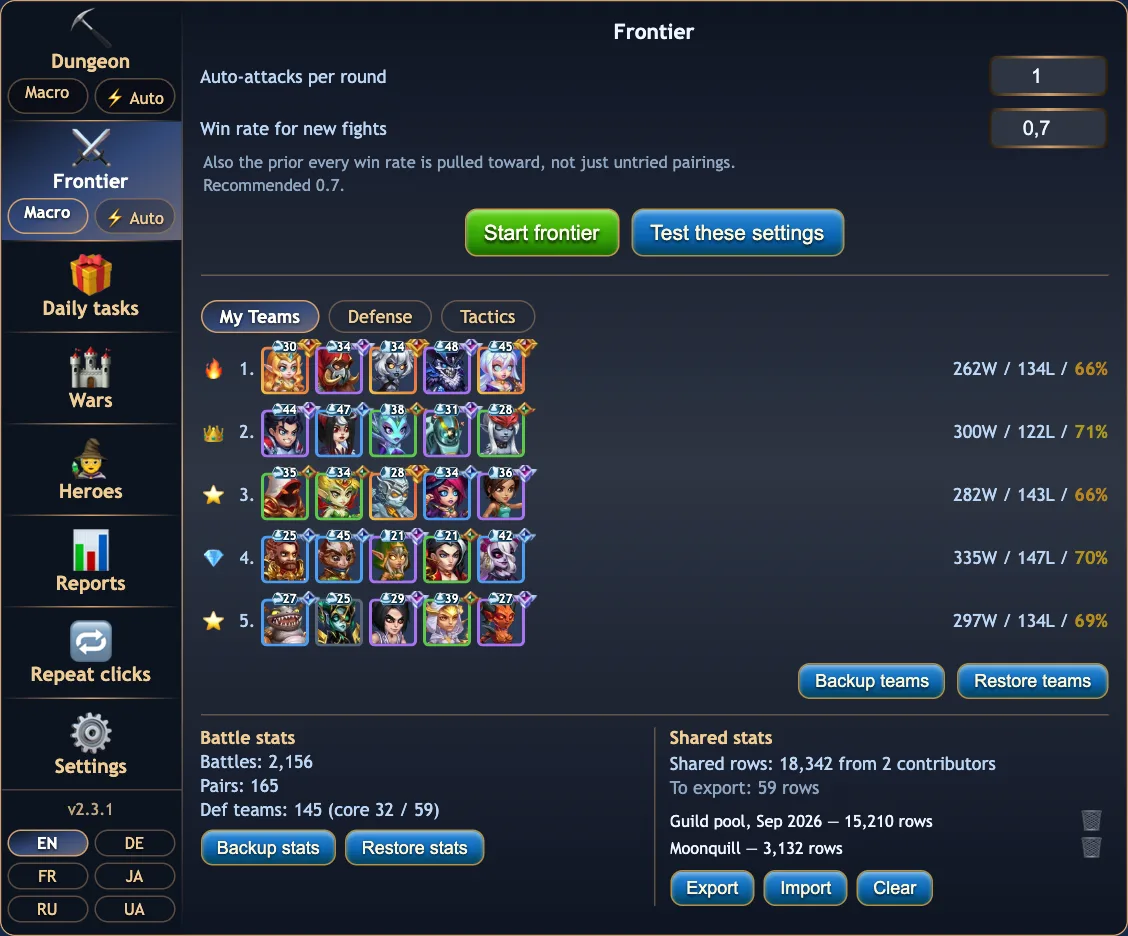
  • My Teams: each attack team's wins, losses and win rate, with a versatility badge (👑 💎 ⭐ 🔥 …).
  • Defense: your lineup against the enemy's, the win rate of every pairing and the overall win chance.
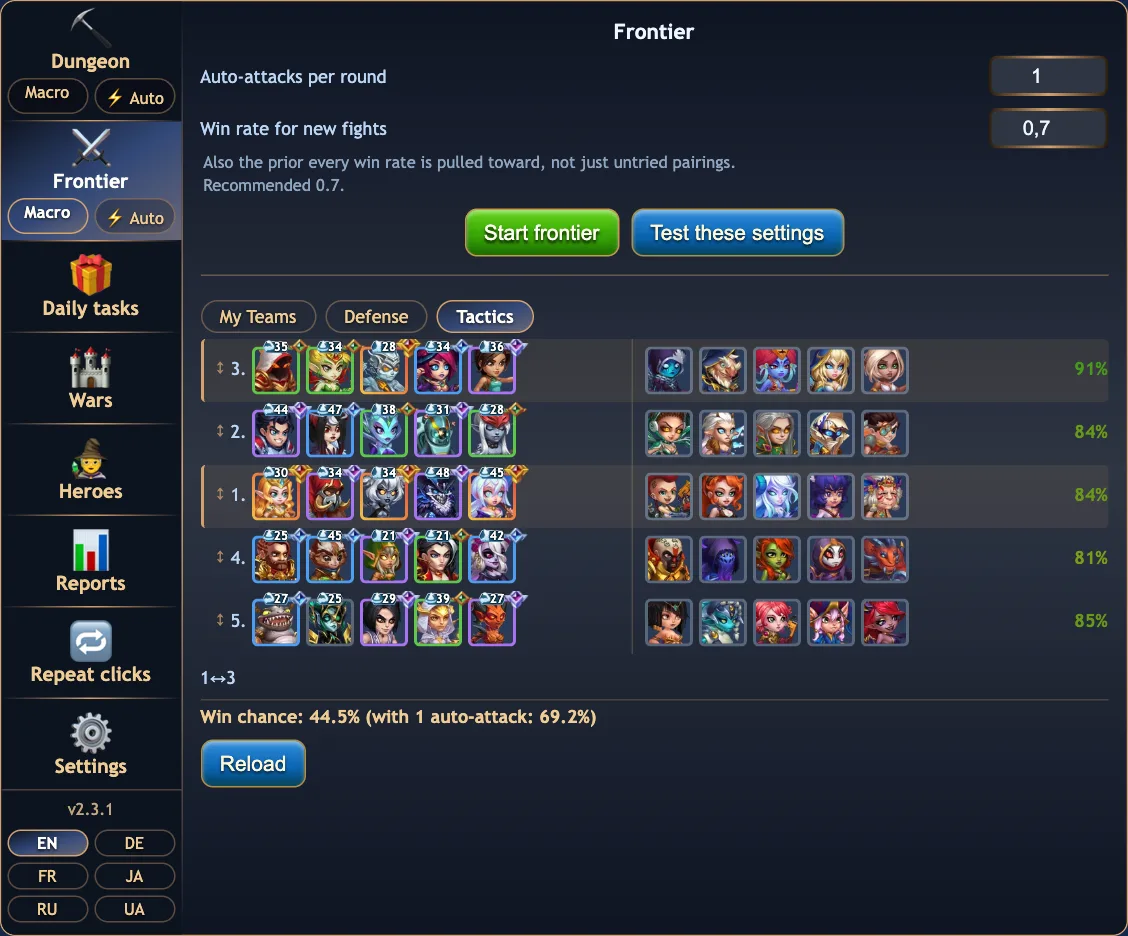
  • Tactics: the planned swaps, shown as moves like 1↔3, with the win chance including repeat attempts. Drag a team onto another row to swap by hand.
  • Settings: auto-attacks per round and the win rate assumed for fights never seen.
  • Battle memory stays on your device. Back up and restore it, or export and import pooled stats to share with guildmates.
The Frontier tab in the Tactics view: team 3 moved against the first defender, win rates per pairing and the win chance
Tactics: teams 1 and 3 swap places, which lifts the win chance.
The Frontier tab in the My Teams view with wins, losses and win rate per team and the battle stats section
My Teams, battle stats and shared stats from guildmates.
Full plan

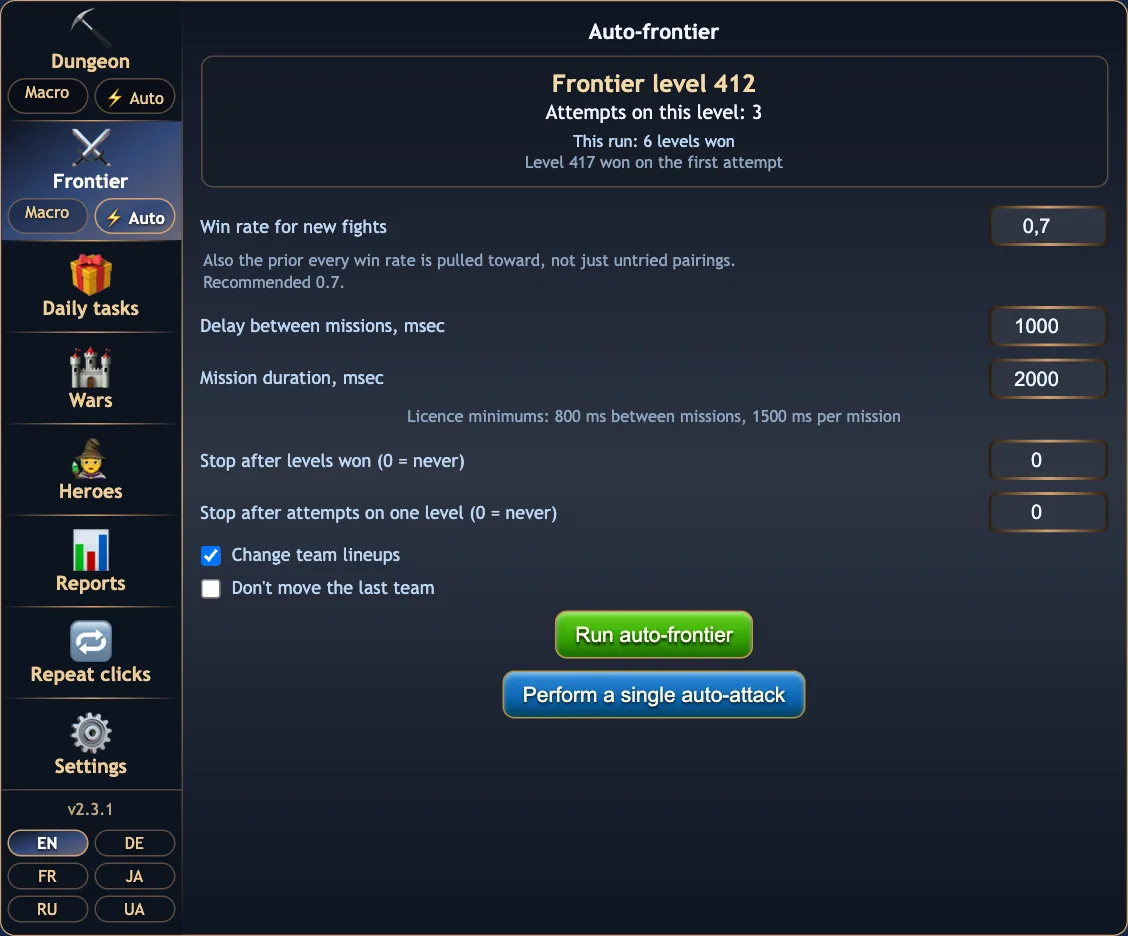
⚡ Auto-frontier

The Frontier through the game server. Each round is sized from the win chance of the planned lineup, and the planner learns from every mission it files.

  • Status: the level, attempts on it, levels won this run and the lineup's win chance.
  • Change team lineups: let it swap your teams between slots, or keep them and stop with a Telegram message when nothing wins.
  • Don't move the last team, for the slot you want to keep as it is.
  • Stop after N levels won, or after N attempts on one level.
  • Pacing: delay between missions and mission duration.
  • Perform a single auto-attack with the Tactics lineup, to try one fight.
The Auto-frontier tab with the level box, pacing and stop settings, the two checkboxes and the run buttons
Auto-frontier settings.
🎁 Daily tasks

The daily chores in one press

Free

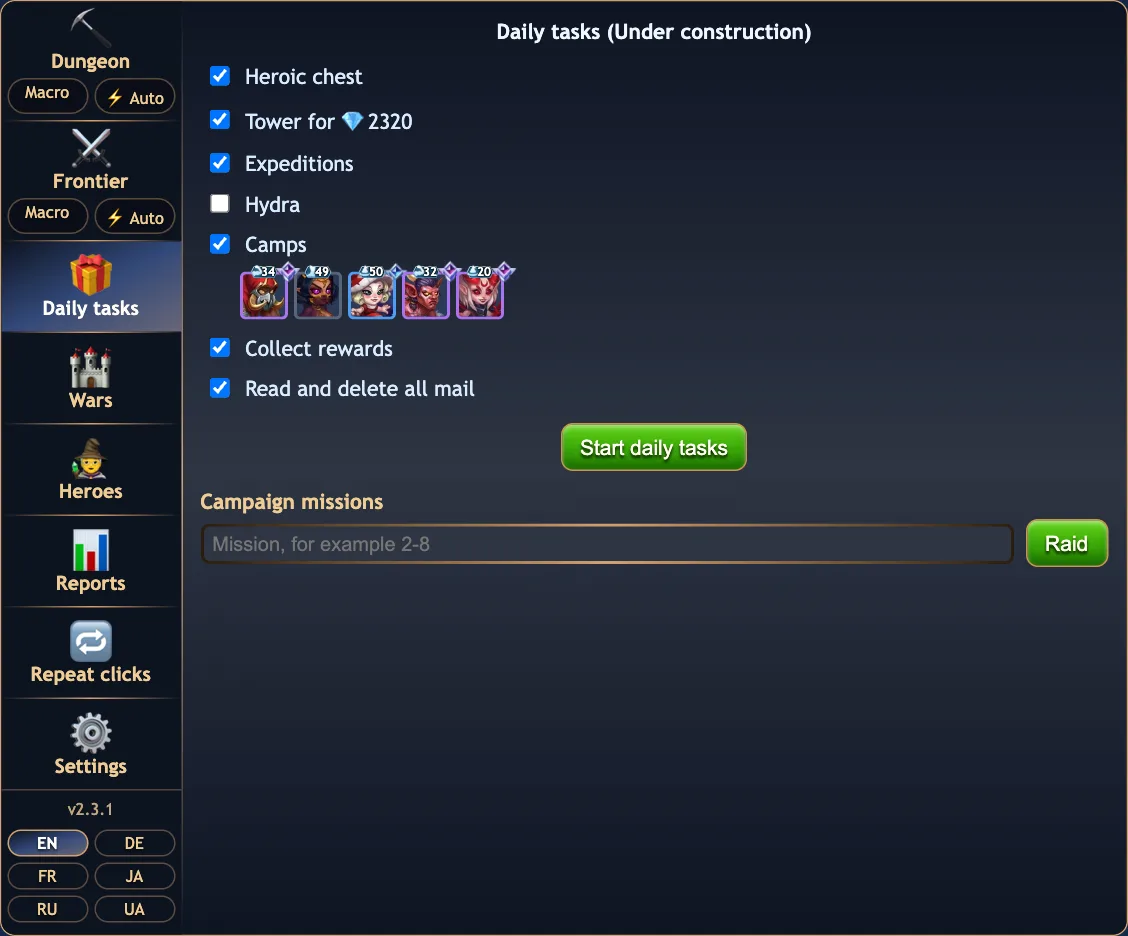
Tick what you want done and press Start. The tasks run in order with a progress bar per task.

  • Heroic chest, Tower, Expeditions, Hydra, Camps, Collect rewards, Read and delete all mail.
  • Camps are fought with the team you last used on a camp; it is shown under the checkbox.
  • Collect rewards sweeps attention bonuses, cinema, the zeppelin gift, the daily bonus, map reports, arena rewards, the Eternal Frontier chest, Grand Arena coins, every quest tab, chain quests and battle pass levels.
  • Read and delete all mail collects letters with a reward and deletes the rest.
  • Campaign raid: type a mission like 2-8 and press Raid. Shows the energy left.
The Daily tasks tab with the task checklist, the camp team and the campaign raid field
Daily tasks.
🏰 Wars

Know the enemy defence before you attack

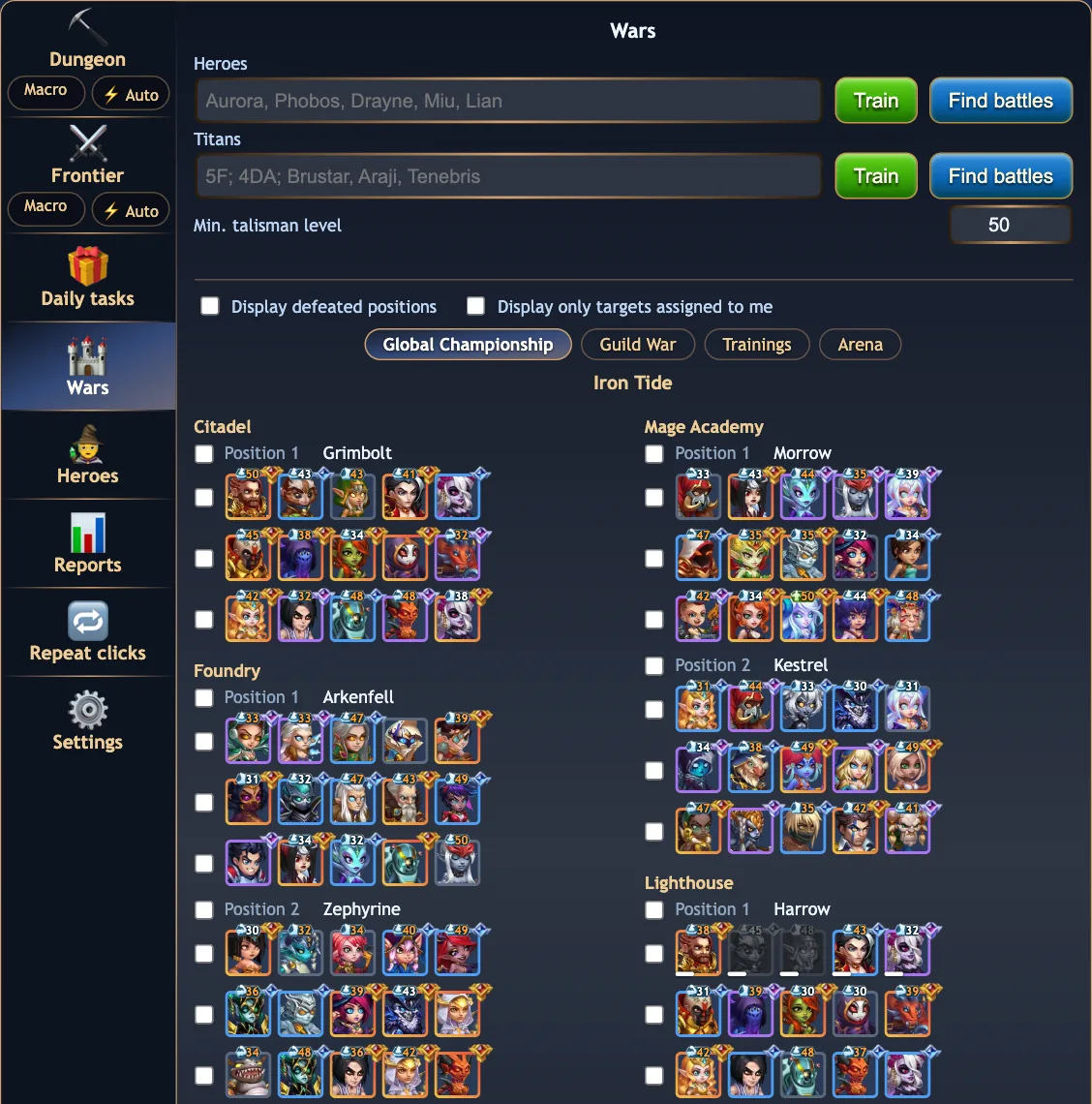
The Wars tab lists the enemy defence in Global Championship and Guild War, every building and position, with relics and talismans.

Full plan

Enemy line-ups and training

  • Citadel, Foundry, Mage Academy, Lighthouse and Barracks, every position and team, plus the titans.
  • Talisman warnings: a talisman level you cannot match is painted on the portrait.
  • Dead and wounded enemy heroes are greyed, with their energy, once a slot has been attacked.
  • Train: one click creates a training team against the exact lineup, heroes or titans, or every titan team of the war at once.
  • Hero and titan names autocomplete in six languages, with a portrait grid of your roster sorted by power and filtered by faction and class. Titan shortcuts: 5D, 4DA, 5E, 5F.
  • Compare their total defence power and relic counts with yours.
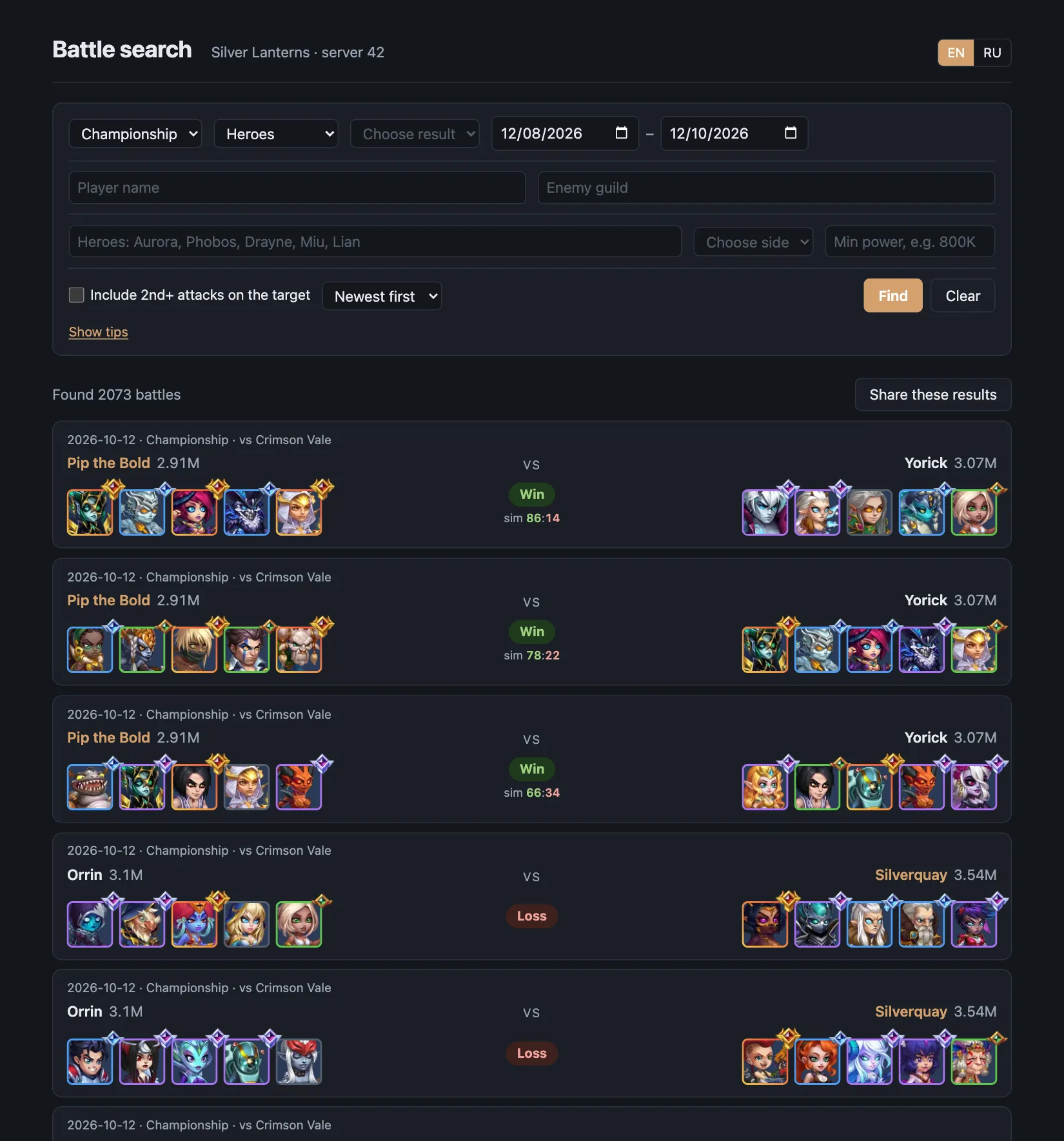
  • Find battles opens the guild battle search for the lineup you typed.
The Wars tab listing the enemy Championship defence per building and position with checkboxes
Global Championship: the enemy defence per building and position.
Basic & Full

Help from the audience

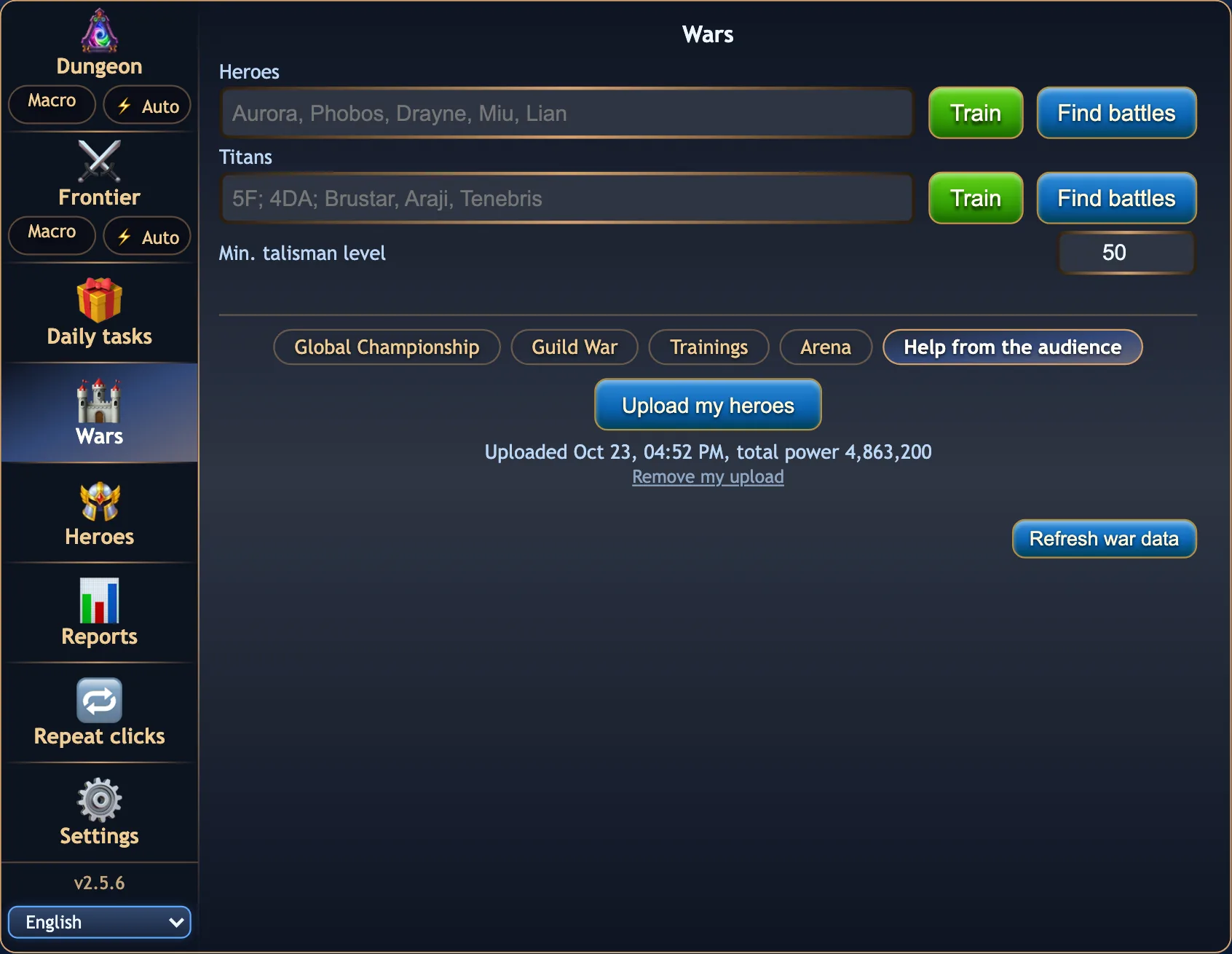
One button, Upload my heroes, sends your heroes and titans to your guild's reports server: each hero's power, relic and talisman, and a hero owning a second talisman in both versions.

  • The guild master and generals then see them on the members' heroes and defence page, next to the Championship defence you stand in.
  • The line under the button says when you last uploaded and your total power; a new upload replaces the old one, and Remove my upload takes it off the server.
  • Any licence key may upload, Basic or Full.
The Wars tab on the Help from the audience chip with the Upload my heroes button and the date of the last upload
Help from the audience: your heroes, uploaded for the guild's generals.
🧙 Heroes

Gear, talismans, glyphs, skins and artifacts for the whole roster

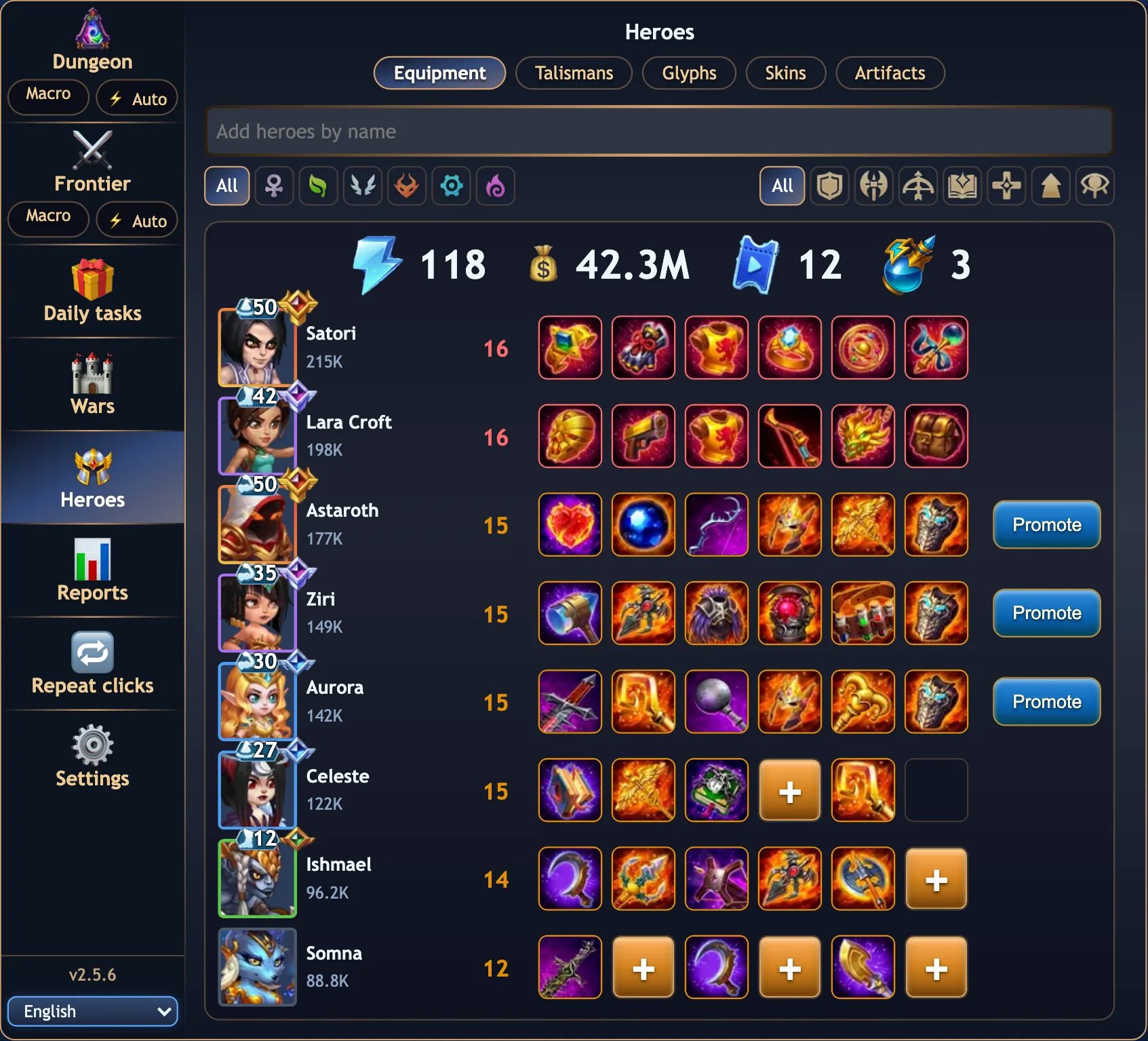
Pick heroes by name, or filter the roster by faction and class, and see what each one is missing. Five tabs, each with what you hold at the top and, on every upgrade, what it costs and whether you can pay for it now.

Free

Equipment and the forge

  • One row per hero: rank, power and the six gear slots, worn items shown with their icons.
  • Click any slot: the forge works out what the item needs, which campaign missions drop the missing pieces, and about how many raids and how much energy that takes. A worn item can be built once more for the next rank.
  • Build it in one go, raids and crafts included; tick Equip right after crafting to put it on the hero too. Tickets and bottled energy top the energy up when the raids need more than you have.
  • Promote appears when a hero has all six slots filled.
  • Your energy and gold at the top.
The Heroes tab on Equipment: seven heroes with rank, power and six gear slots, empty slots with a plus button
Equipment: a + on every slot that can be forged.
Free

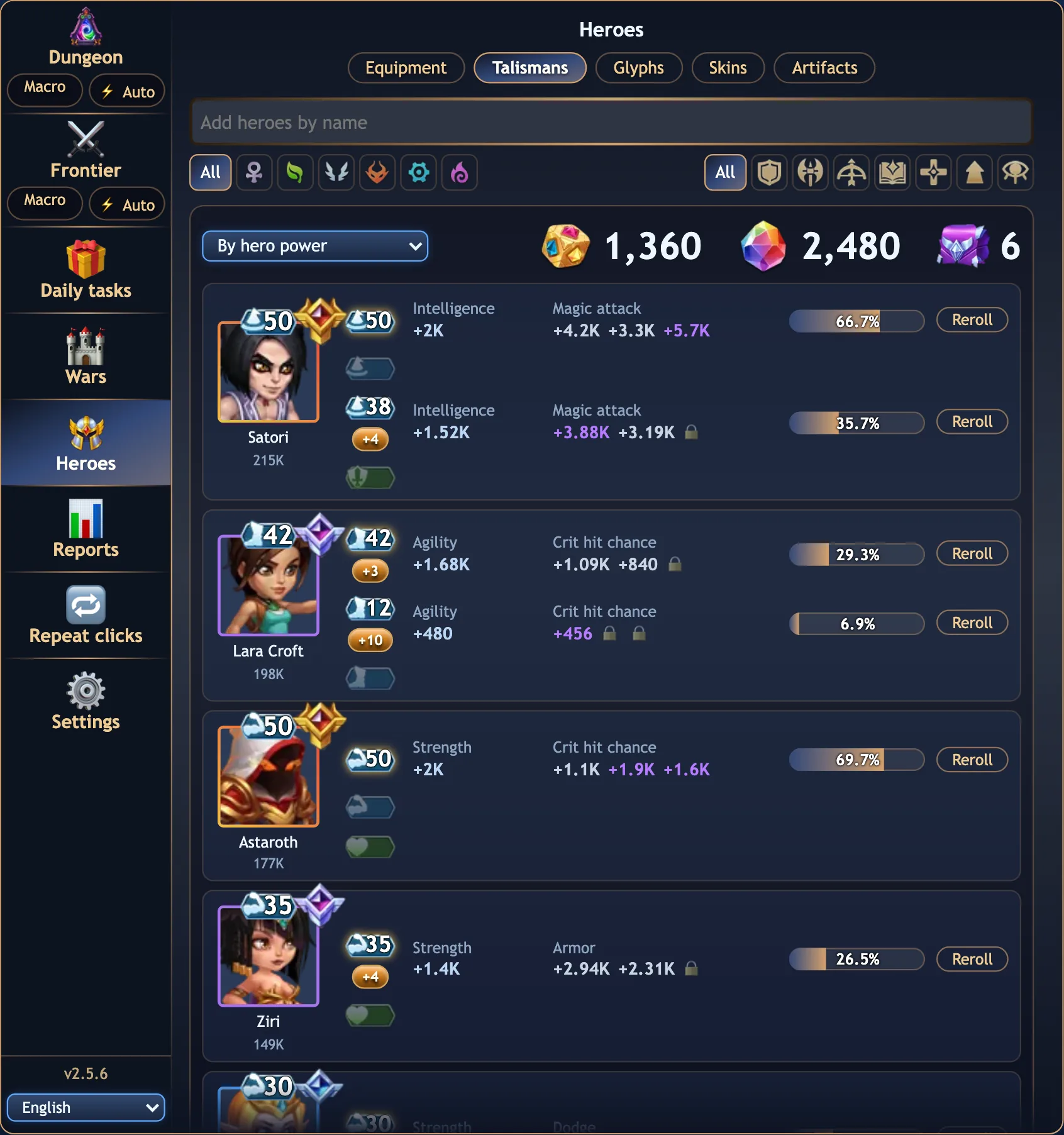
Talismans

  • Every talisman a hero can own, worn or not, with its level, main stat and extra stat slots, the rolls coloured by tier.
  • A completion bar: how close the main and extra stat are to their maximum.
  • Level up with mastery crystals: the pill shows how many levels you can afford.
  • Reroll the extra stats with meta cubes or emeralds, several times in a row.
  • Sort by hero power, strongest or weakest talisman first.
The Heroes tab on Talismans: per hero the talisman badge, level-up pill, stats, completion bar and Reroll button
Talismans with their rolls and completion.
Free

Glyphs

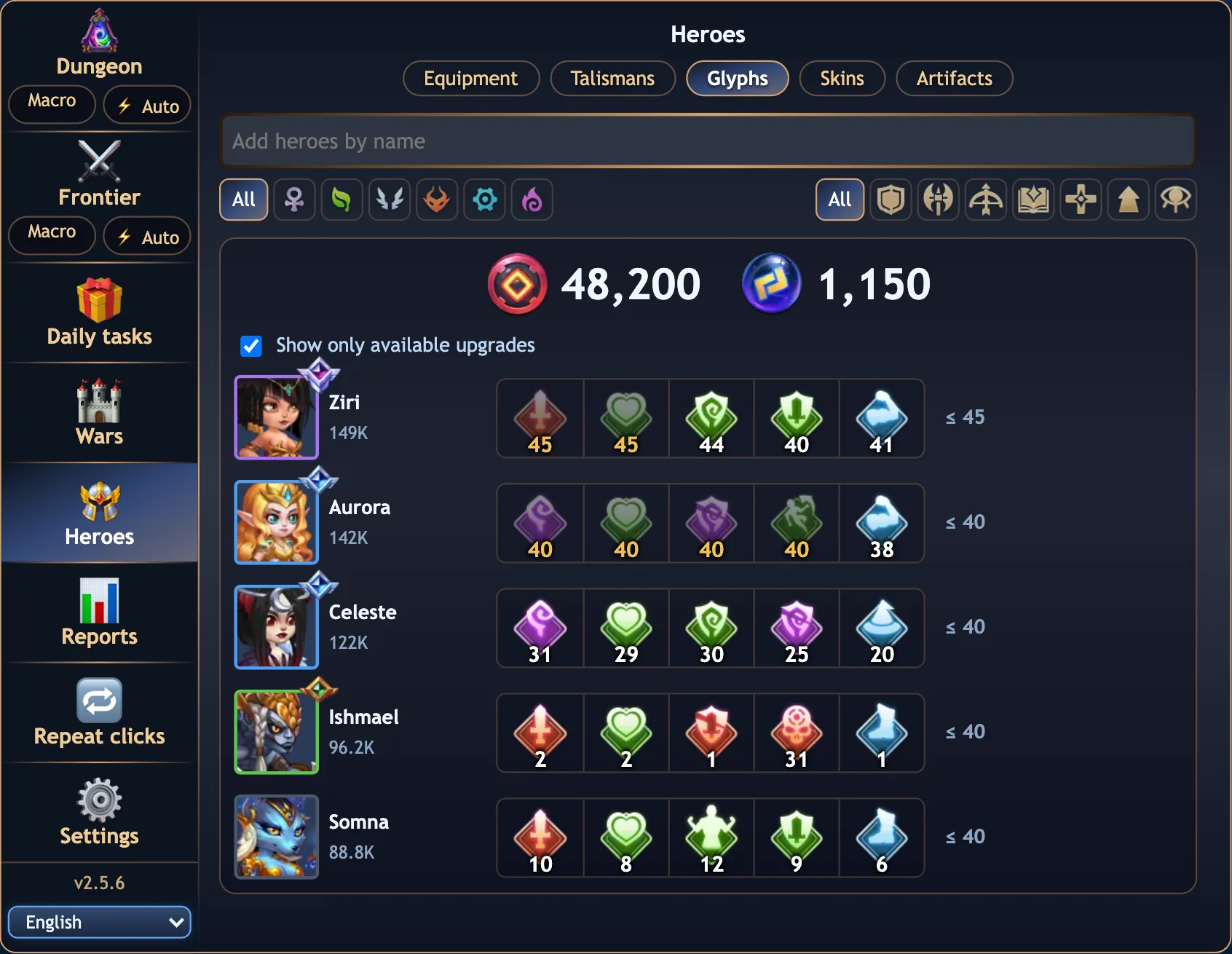
  • Every hero's five glyphs with their levels and the cap the hero's class improvements allow.
  • Rune stones and rune spheres held at the top. A glyph the stones cannot level once is dimmed.
  • Click a glyph to level it up, as many levels as you choose; Improve raises the cap for rune spheres, after a confirmation.
  • Show only available upgrades hides the heroes with nothing to do.
The Heroes tab on Glyphs: rune stones and spheres held, five glyph levels per hero and the cap per hero
Glyphs: five levels per hero, the cap on the right.
Free

Skins

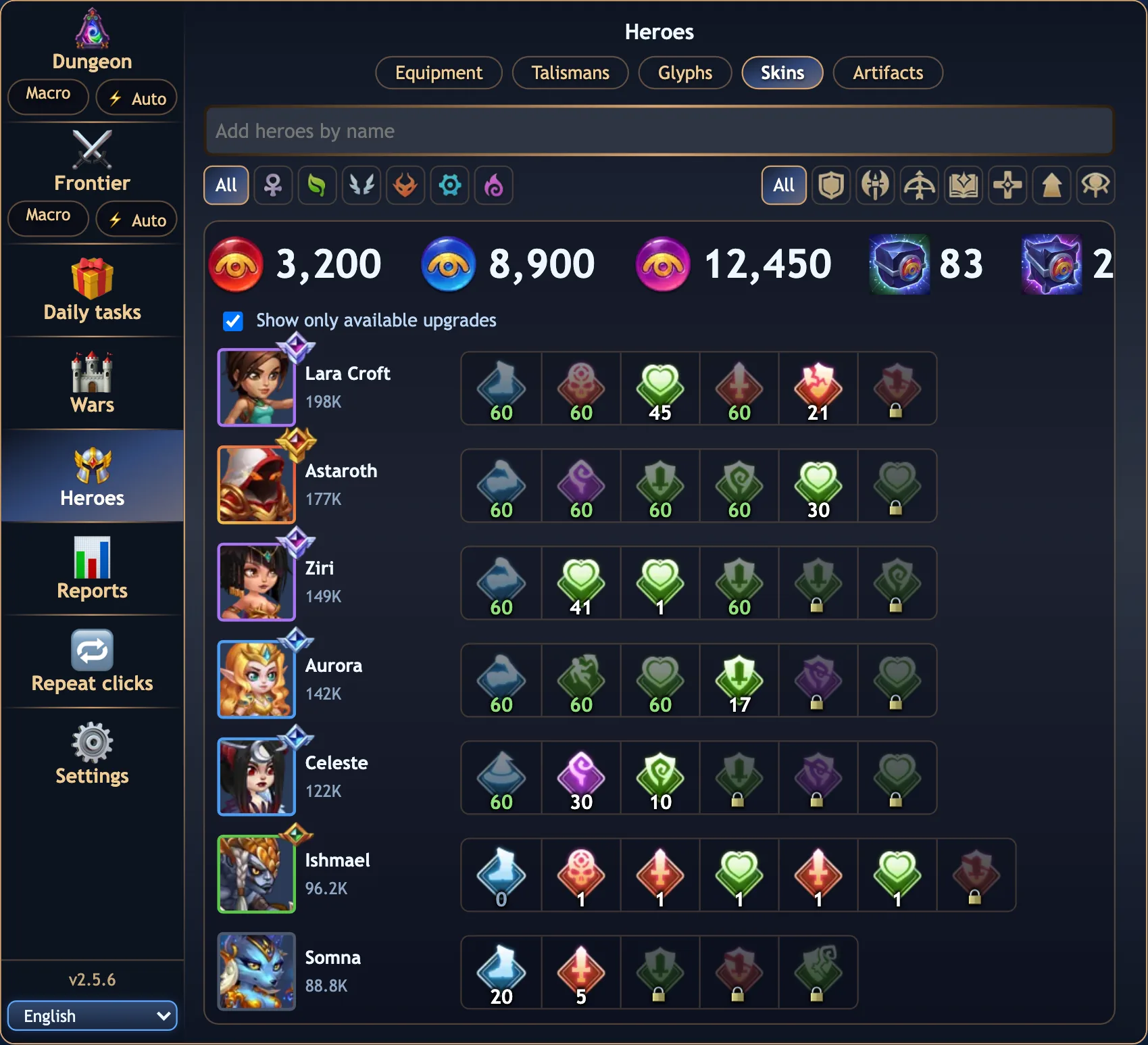
  • Every skin a hero has, with its level, a gold mark on a skin whose skin+ is unlocked, and a lock on the ones not bought yet.
  • Strength, agility and intelligence stones at the top, with the skin stone chests you hold.
  • Click a skin to level it up; the chests are opened for the stones the levels need, if you let them.
  • The same Show only available upgrades filter as the glyphs.
The Heroes tab on Skins: the three stone counts and the chests held, then each hero's skins with their levels and locks
Skins: levels, locks and the stones to pay with.
Free

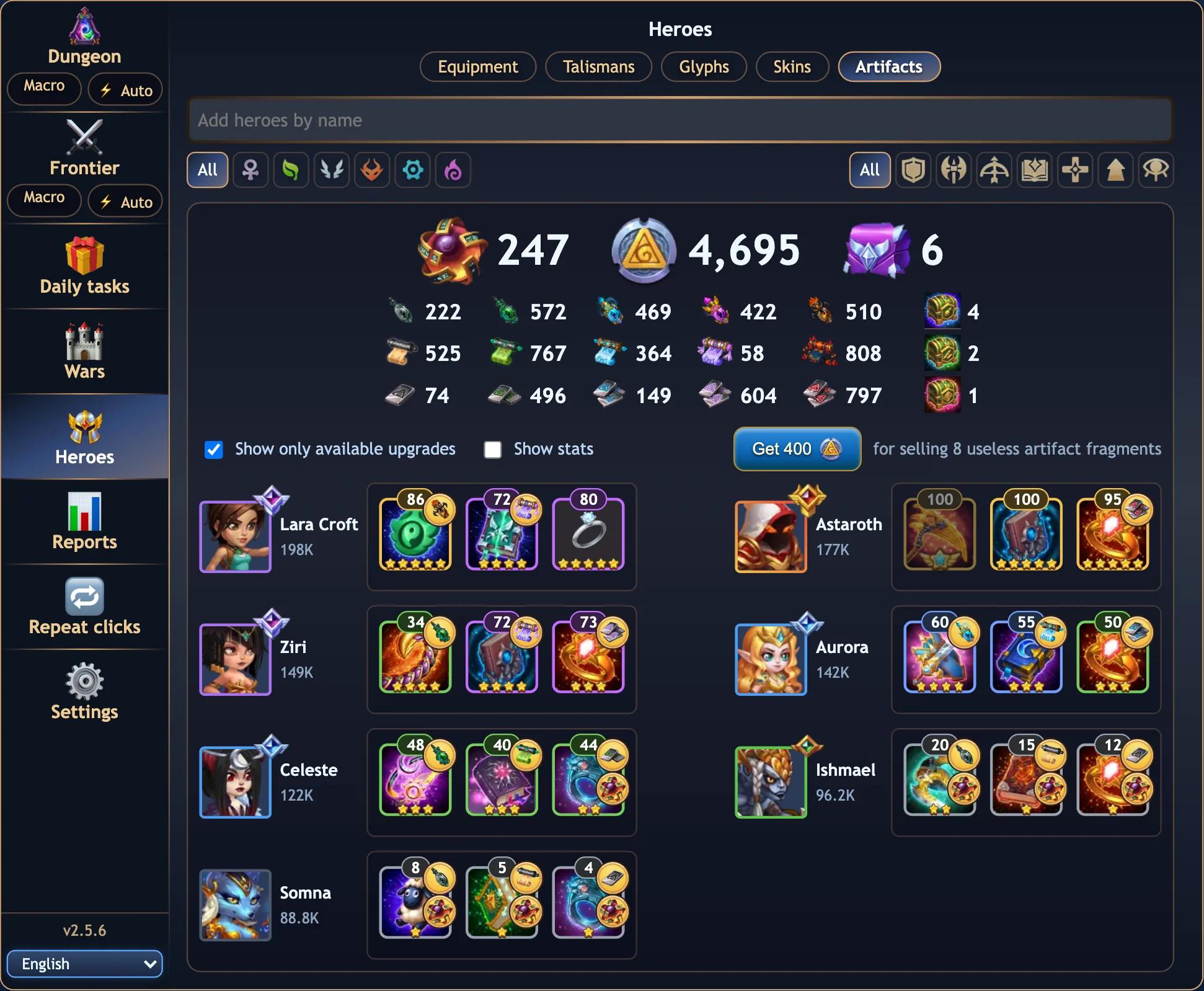
Artifacts

  • Weapon, book and ring of every hero with their level and stars, two heroes to a row; tick Show stats for what each one adds.
  • The materials by type and tier, the chaos cores, the artifact coins, the material chests and the Heroes Troves, all at the top.
  • Click an artifact: level it up, buy the fragments the next star needs in the shop, and upgrade the star. Chests and troves are opened for what the levels need.
  • A button sells the fragments nothing needs any more, for artifact coins.
The Heroes tab on Artifacts: chaos cores, artifact coins and troves, the materials grid, and the weapon, book and ring of each hero with levels and stars
Artifacts: materials above, three artifacts per hero below.
📊 Reports

Your guild's wars, in numbers

The guild master and generals upload the guild's Guild War and Championship battles from the Reports tab. From then on every member can open the reports on hwa-bot.dev: who attacks best, which teams win, which heroes everyone plays, how the guild grows, who earned the MVP, and every battle, searchable.

Full plan

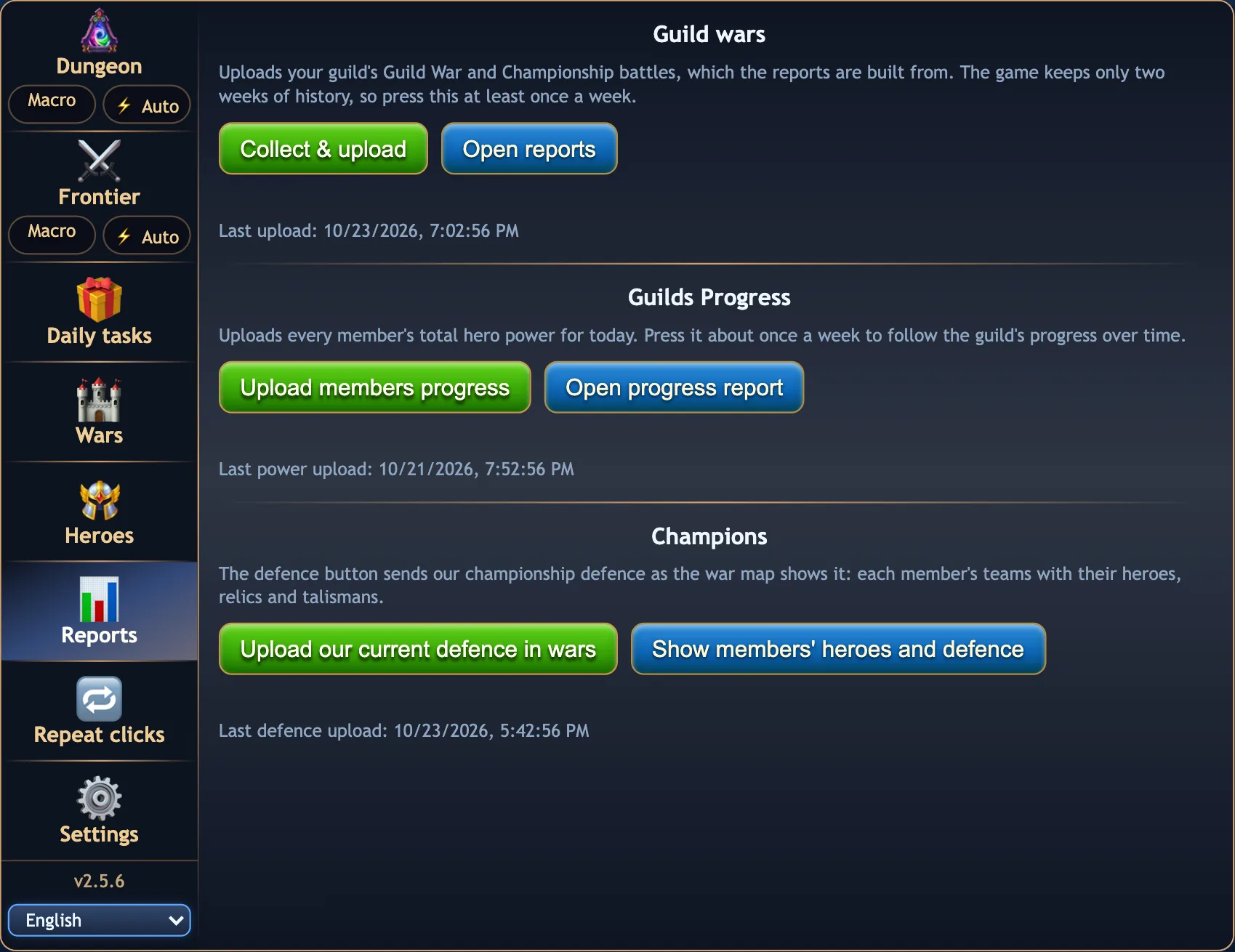
The Reports tab

  • Collect & upload sends every war day the game still keeps (about two weeks); days already stored are skipped. Opening the tab runs it by itself, at most once an hour.
  • Guilds Progress: uploads every member's total hero power for the progress report.
  • Champions: Upload our current defence in wars sends the guild's Championship defence as the war map shows it, every member's teams with heroes, relics and talismans; Show members' heroes and defence opens the page that puts it next to the heroes the members uploaded.
  • Shown to the guild master and generals; members open the pages from links they share, or from the Wars tab's Find battles.
The Reports tab with the Guild wars upload, Guilds Progress and Champions sections
The Reports tab in the extension.

Guild war reports

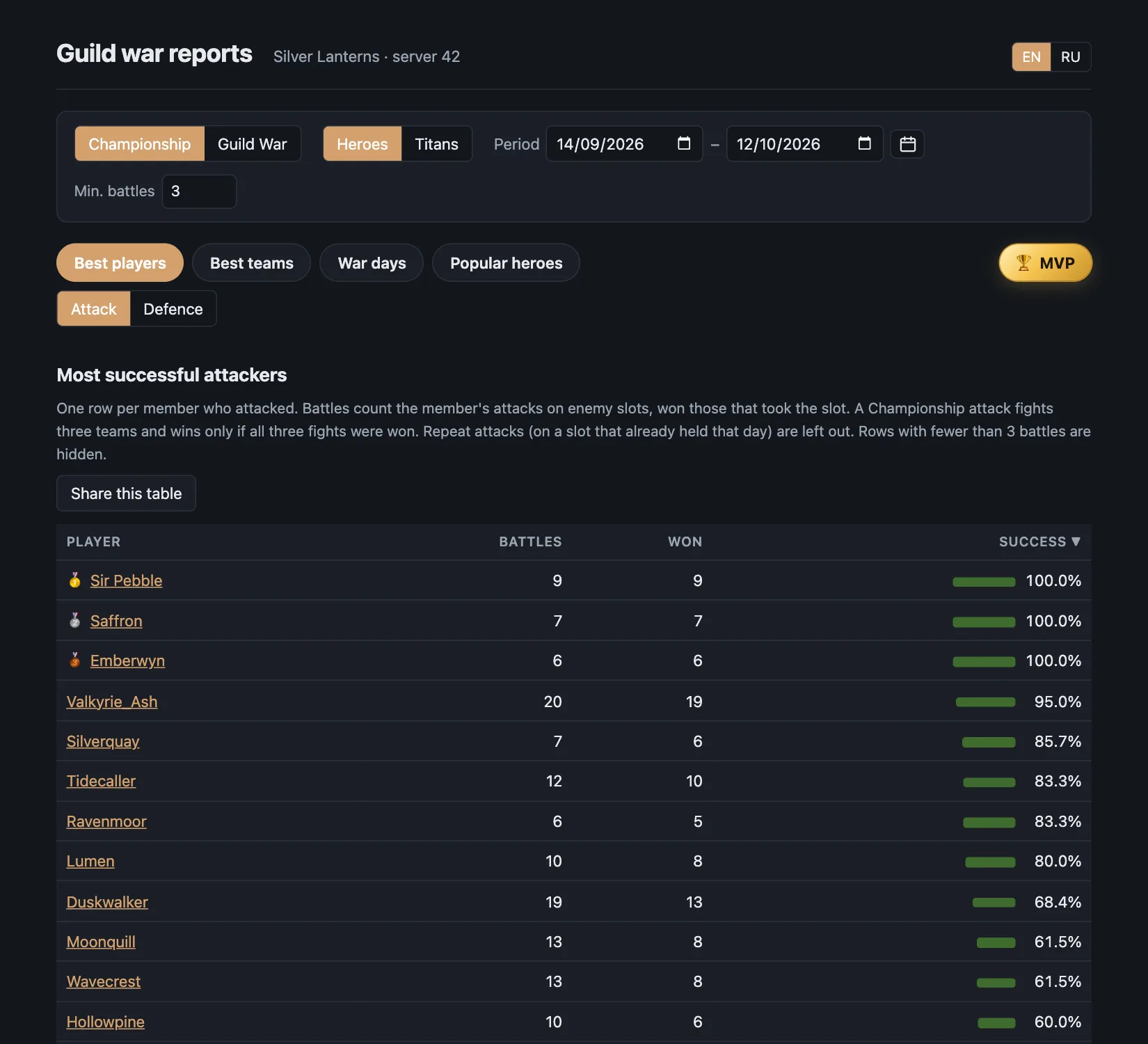
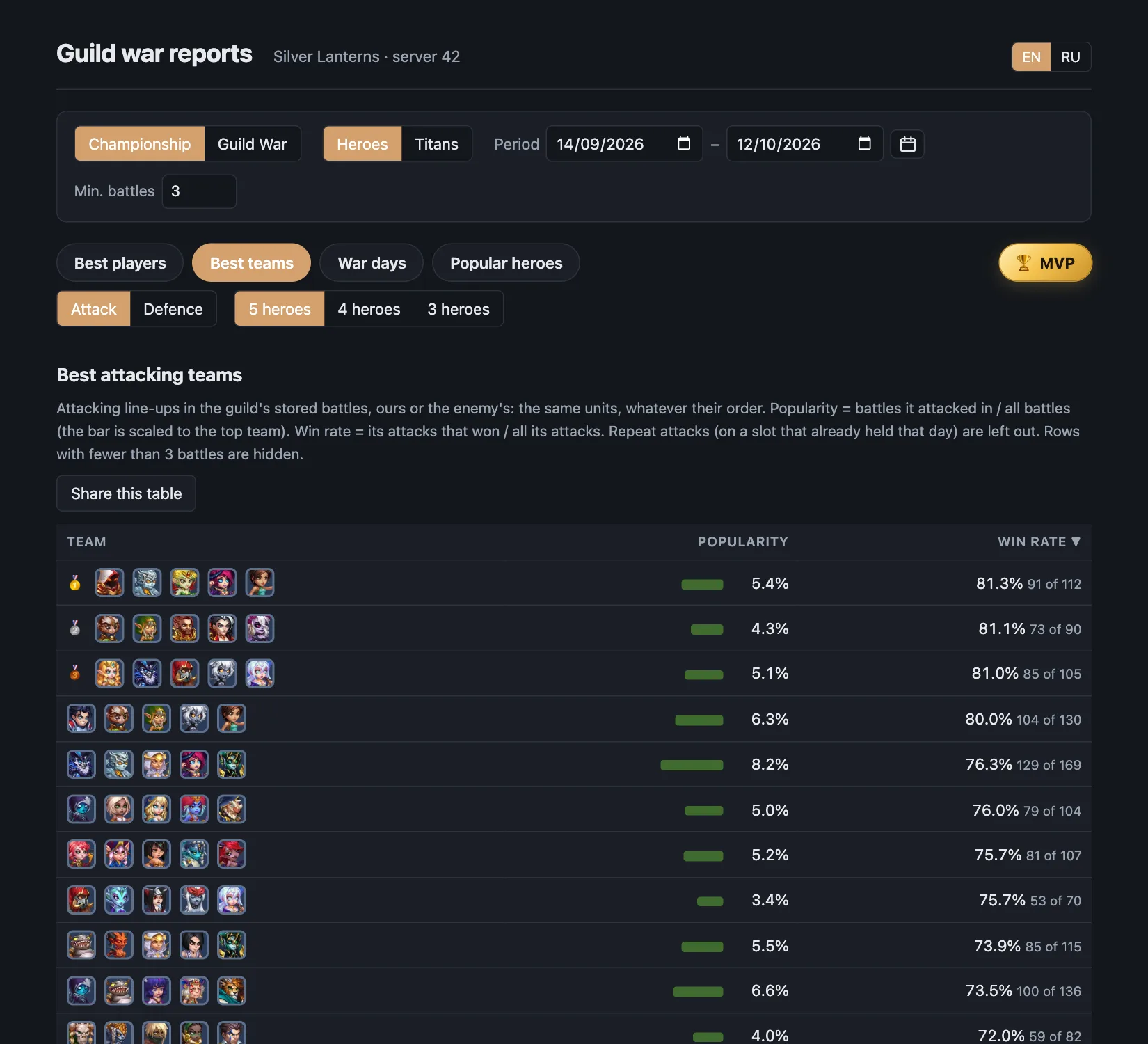
Championship or Guild War, heroes or titans, any period. Every table says exactly what it counts, repeat attacks on a slot are left out, and any table can be shared as a link valid for 30 days.

Best players report: members ranked by attack success with medals
Best players: attack or defence success per member.
Best teams report: attacking line-ups with popularity and win rate
Best teams: line-ups of 5, 4 or 3 heroes by win rate, attack or defence.
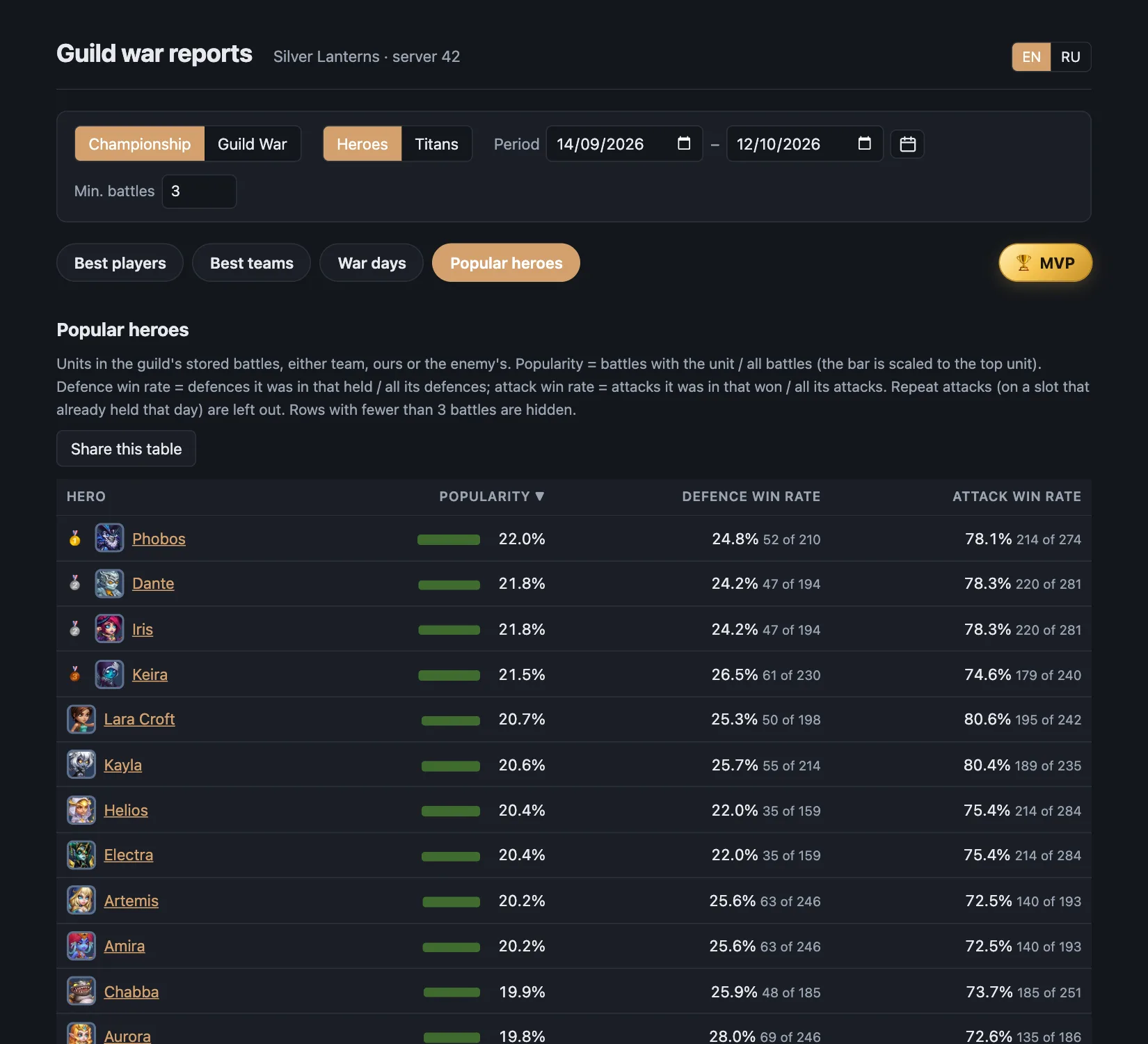
Popular heroes report: each hero's share of battles and win rates
Popular heroes: how often each hero fights and how it does.
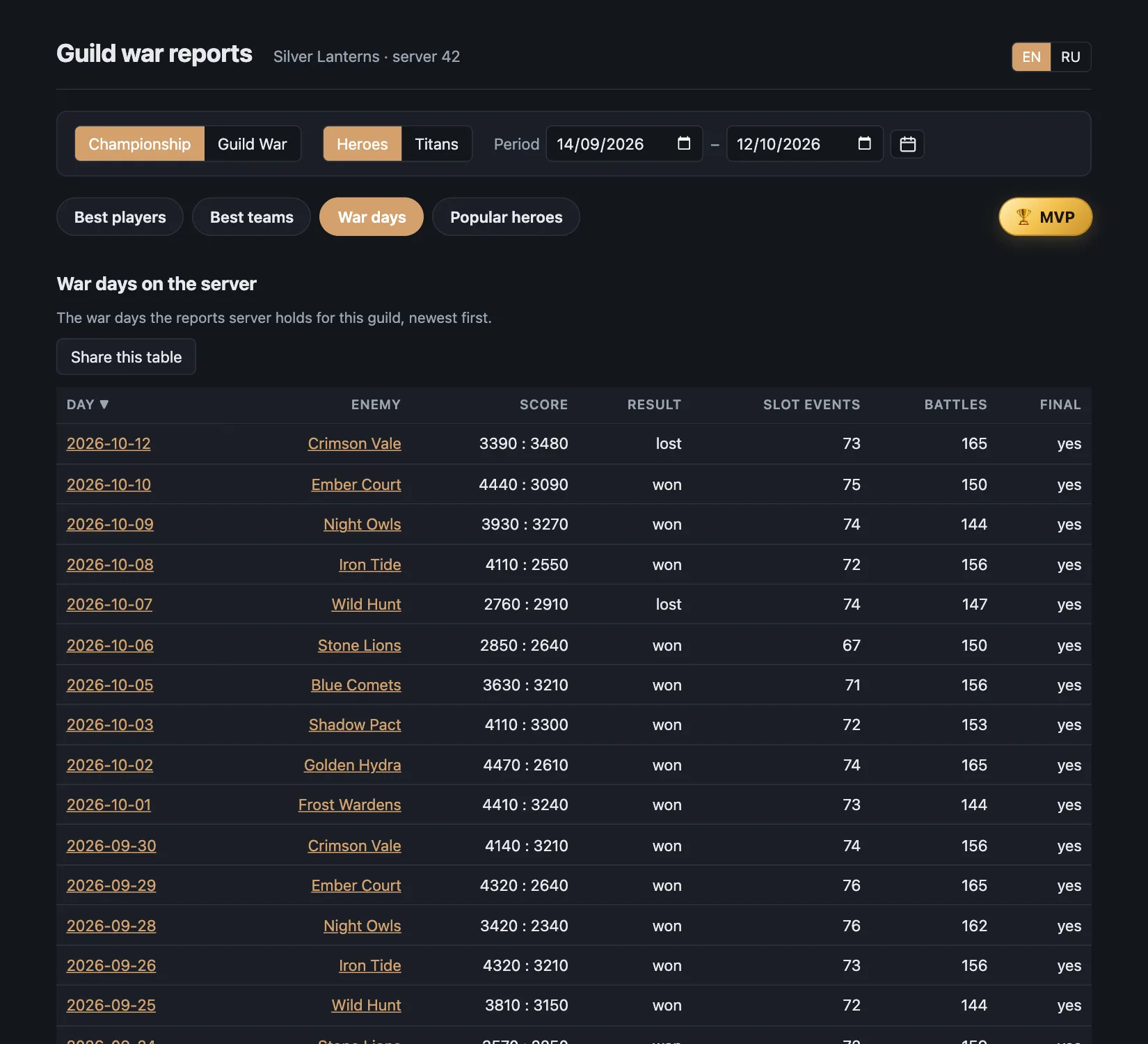
War days report: one row per war day with the enemy guild and points
War days: every day with its enemy, score and result.
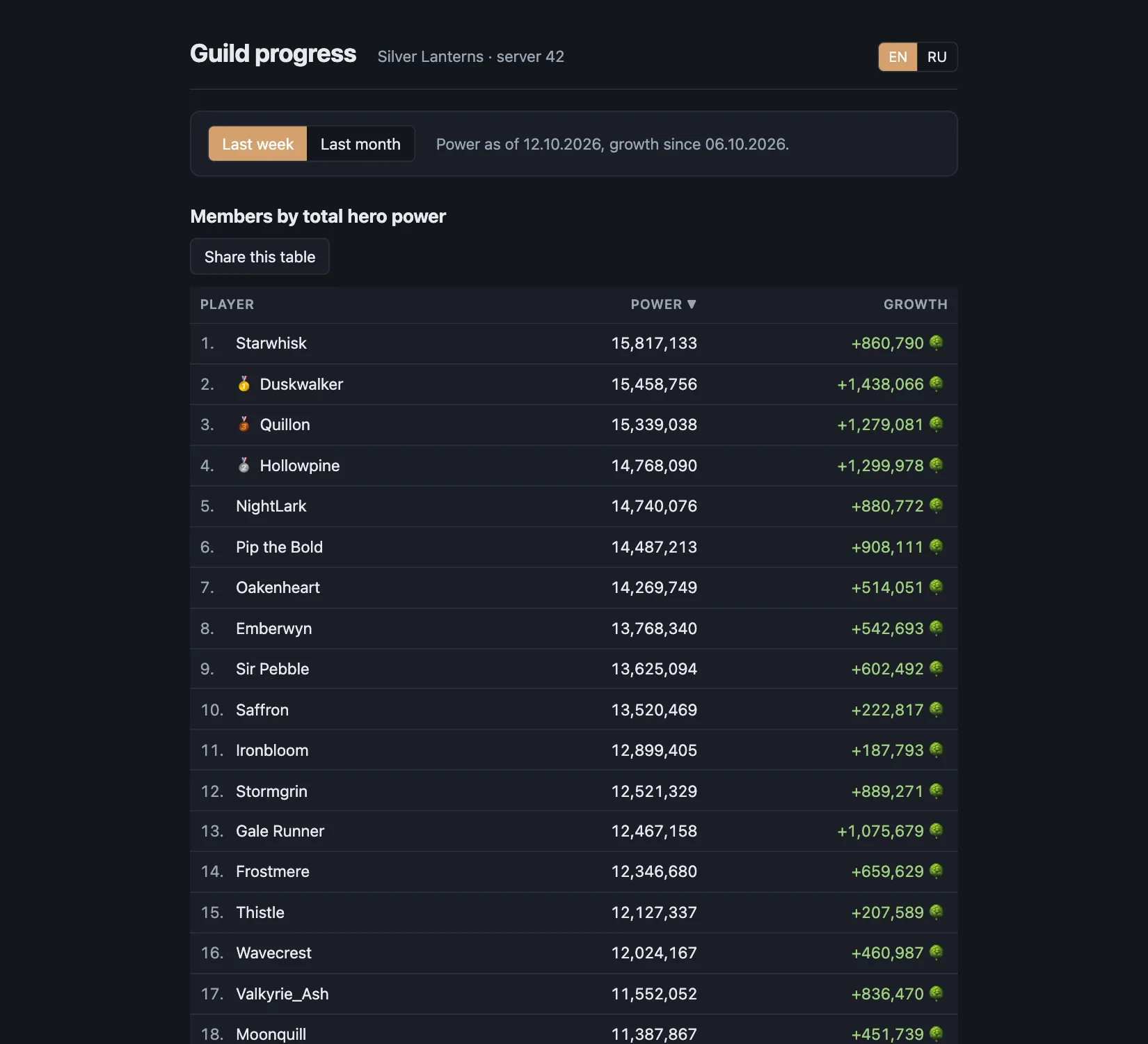
Guild progress: members by total hero power with growth over the last week
Guild progress: members by total hero power, and how much each grew in the last week or month.

🛡️ Members' heroes and defence

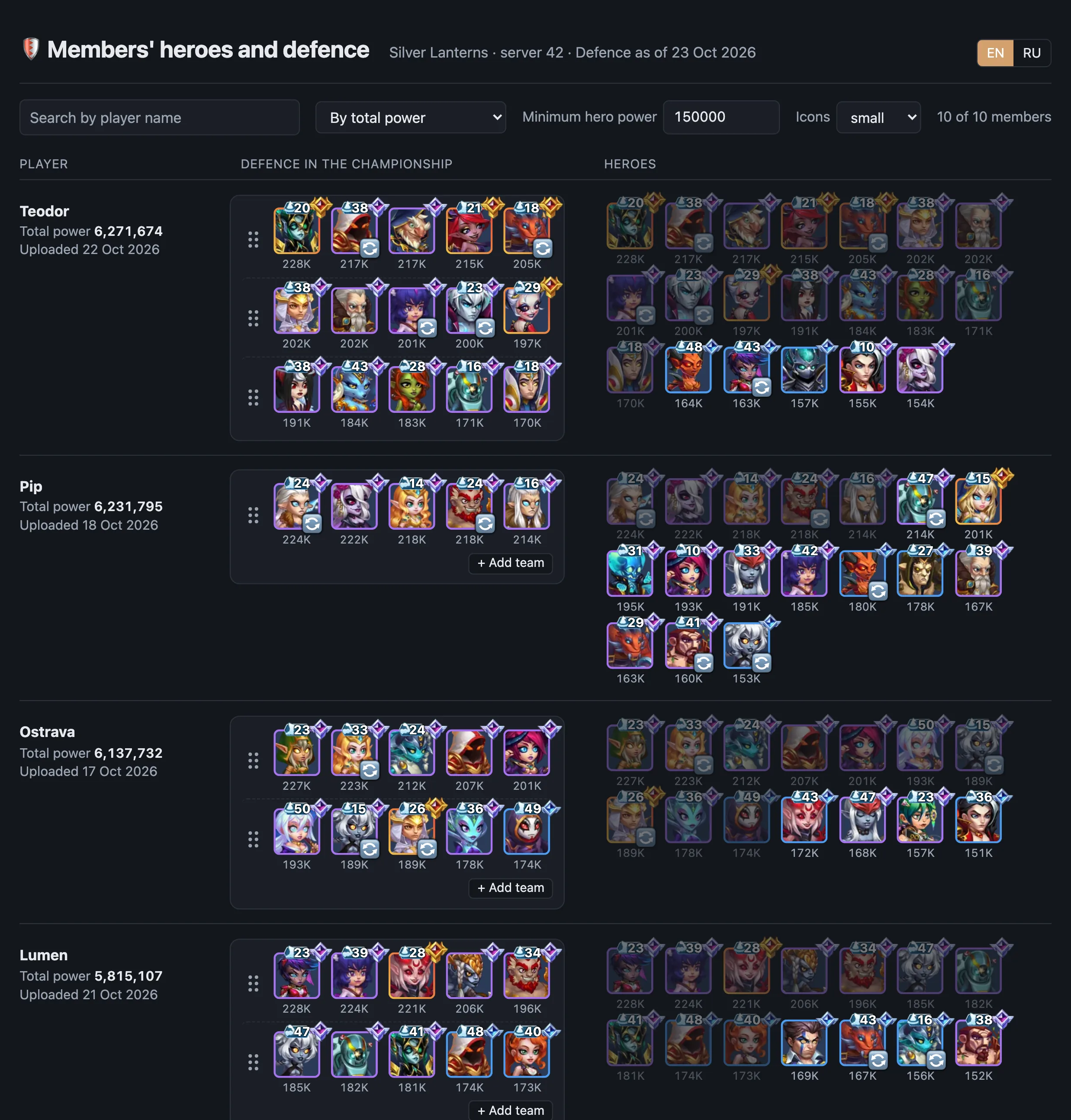
For the guild master and generals: one row per member, with the Championship defence they stand in, one team a line, and every hero they uploaded, strongest first, with relic border, talisman level and power.

  • Search by name, order by total power or by the latest upload, hide heroes under a minimum power, pick the icon size.
  • A general can draft the defence right on the page: drag a hero from the heroes column onto a slot, swap two slots, drag a team line onto another, add a third team. A hero standing in two teams is dimmed red.
  • A draft stays in that browser only and is marked modified until it matches the uploaded defence again; 🔄 on a portrait switches between the two talismans a hero owns.
  • The link that opens the page expires after twelve hours; the Reports tab issues a new one.
The members' heroes and defence page: per member the name and total power, the championship defence teams in a box, and every hero with relic, talisman and power
Members' heroes and defence: who, their defence teams, and all their heroes above the minimum power.

🏆 Championship MVP

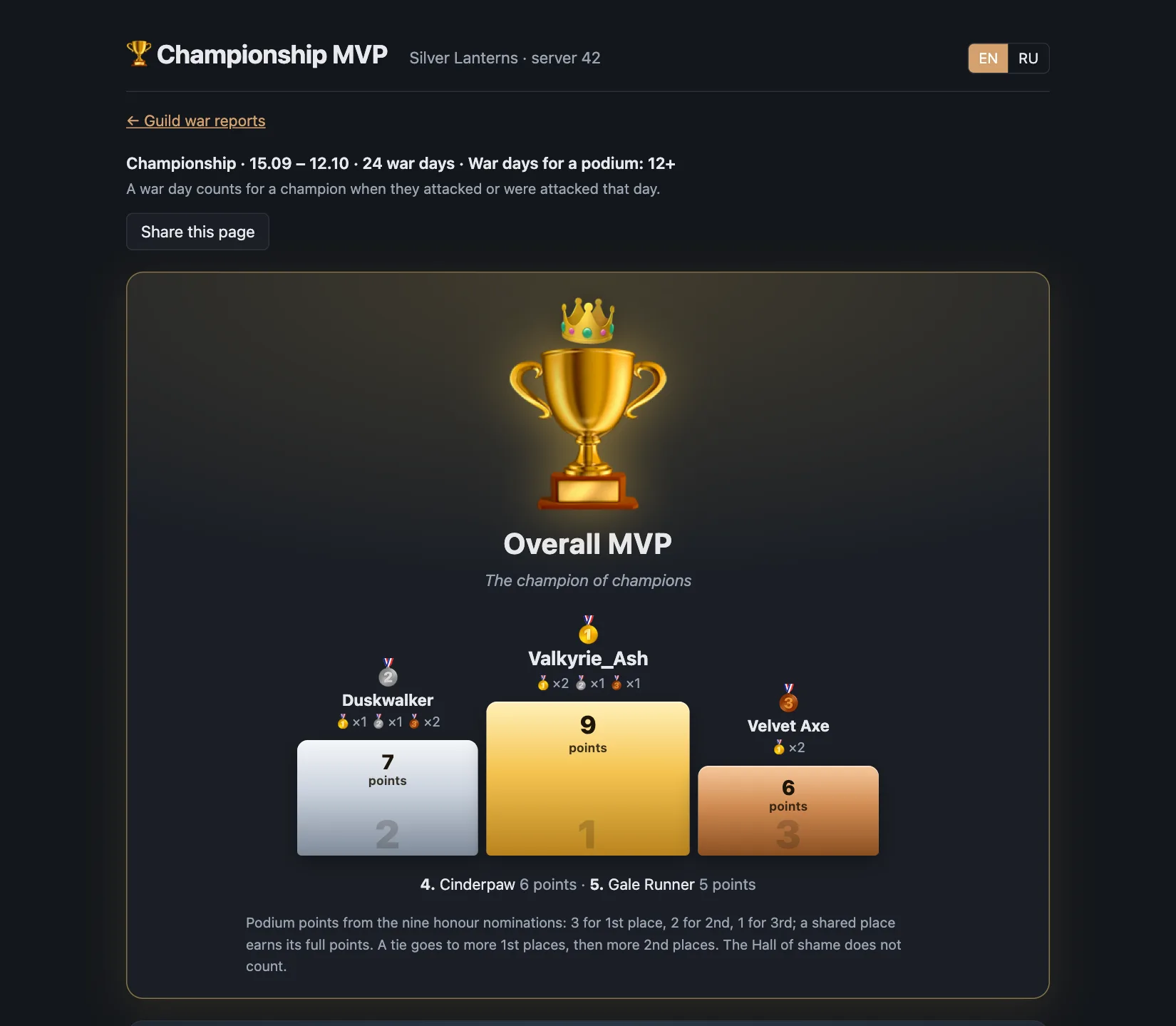
The last 28 days of Championship, turned into awards. Only champions who fought at least half the war days can reach a podium.

  • Overall MVP: podium points from nine honours.
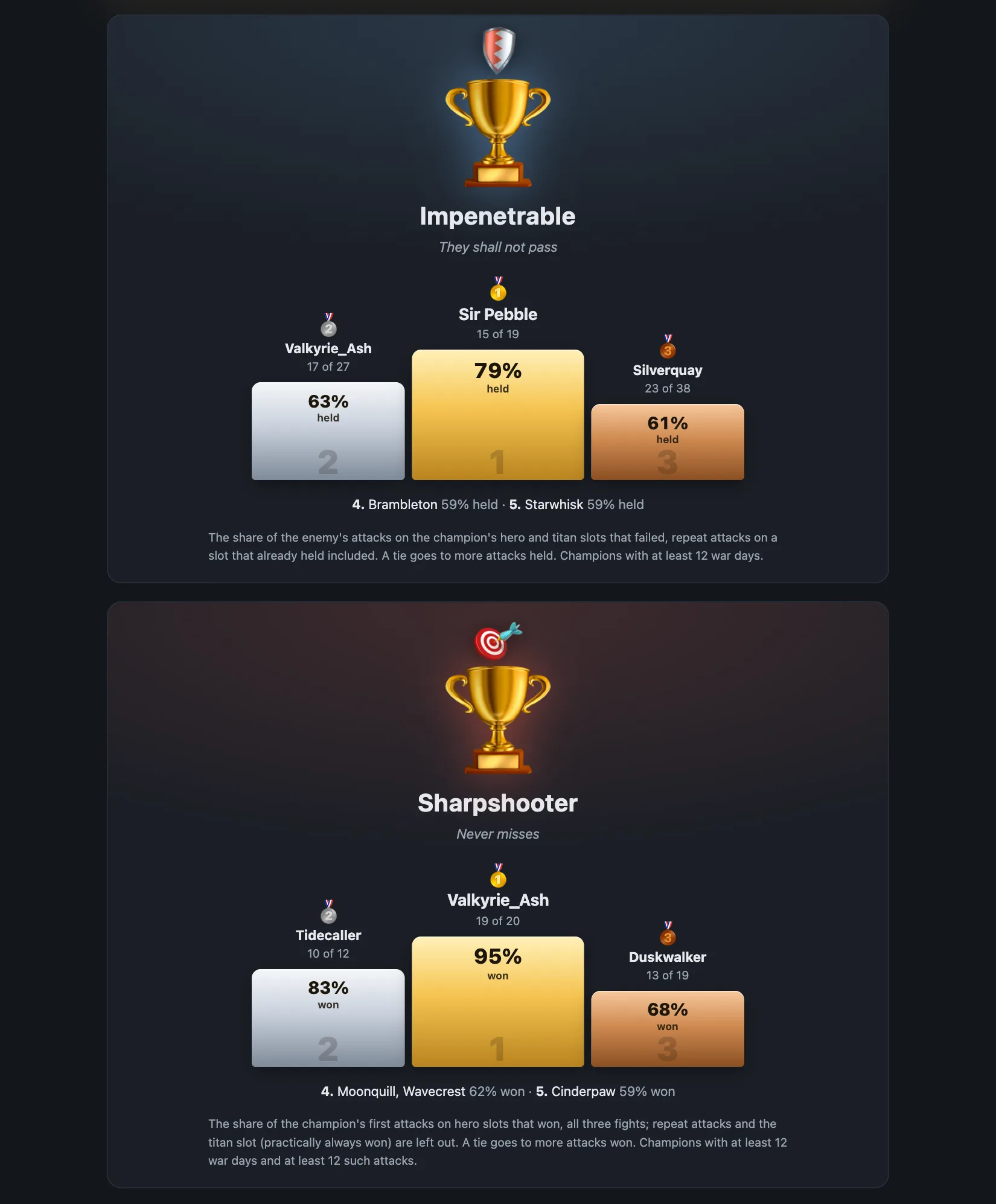
  • Honours: Impenetrable, Sharpshooter, Early Bird, The most scary champion, Master of Disguise, Giant Slayer, Titan Hunter, Hero Collector, Flawless.
  • And a Hall of shame nobody asked for: Loss Leader, AFK Champion, Last-Minute Hero, Necromancer or Kamikaze, Big Bully.
  • Each award explains how it is counted. Share the page with the guild in one click.
Championship MVP page: the Overall MVP podium with points and medals
An MVP report: the Overall MVP podium.
Two MVP nominations, Impenetrable and Sharpshooter, each with a podium
Two of the honours.
🔁 Repeat clicks

Record a sequence, replay it

Free

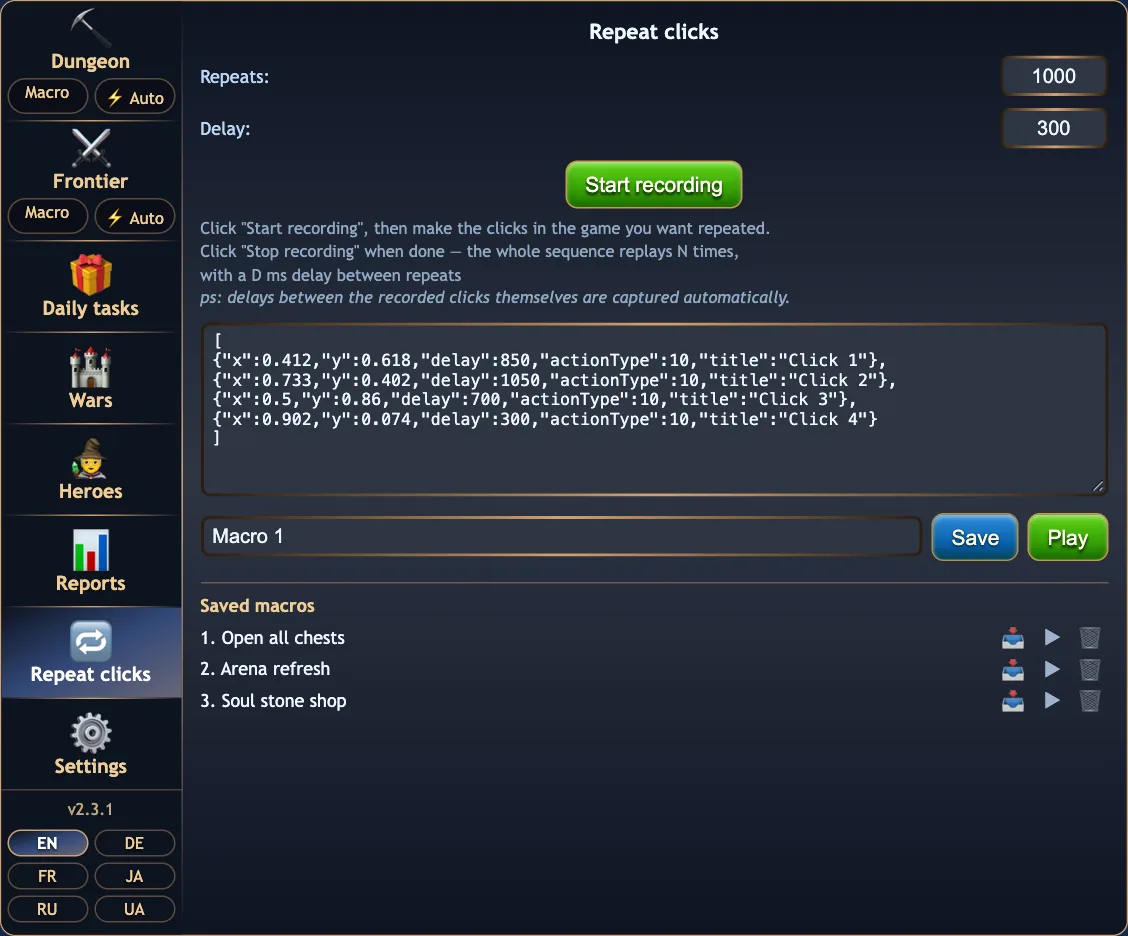
For anything the other features do not cover: record clicks and drags in the game and replay them as many times as you like, with a delay between runs.

  • The recording is shown as editable JSON.
  • Save named macros to a library; load, play or delete each one.
  • Press § anywhere on the page to play or stop.
The Repeat clicks tab with a recorded sequence as JSON and three saved macros
Repeat clicks with a recording and the saved library.
⚙️ Settings

Settings, logs and the toolbar

Free
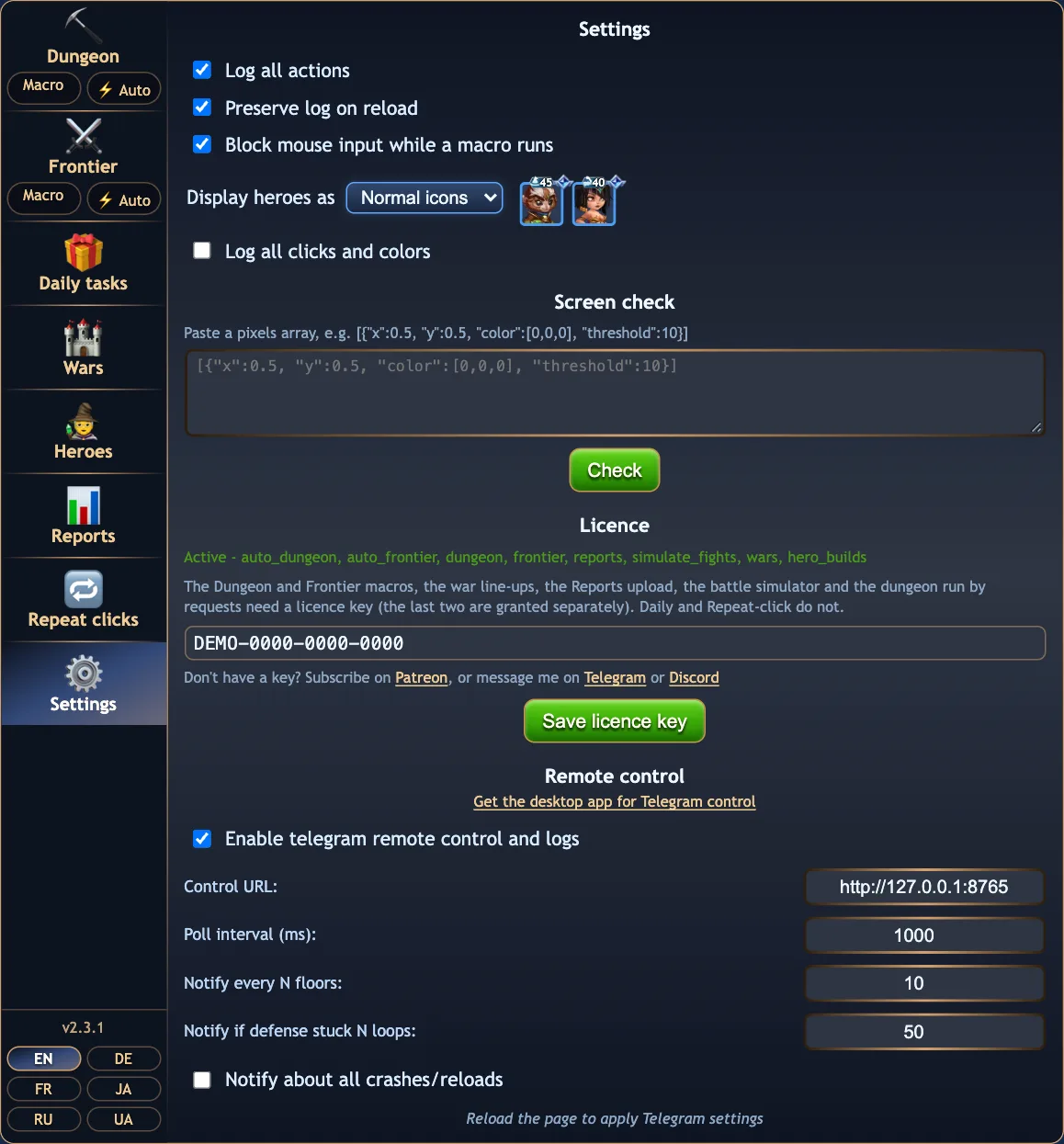
  • Show heroes as names or as icons in four sizes, with relic and talisman badges.
  • Log all actions, keep the log across reloads, block mouse input while a macro runs.
  • Licence key, with a status line that says what the key covers.
  • Remote control: switch Telegram on, notify every N floors, when a Frontier defence is stuck, or about every crash and reload.
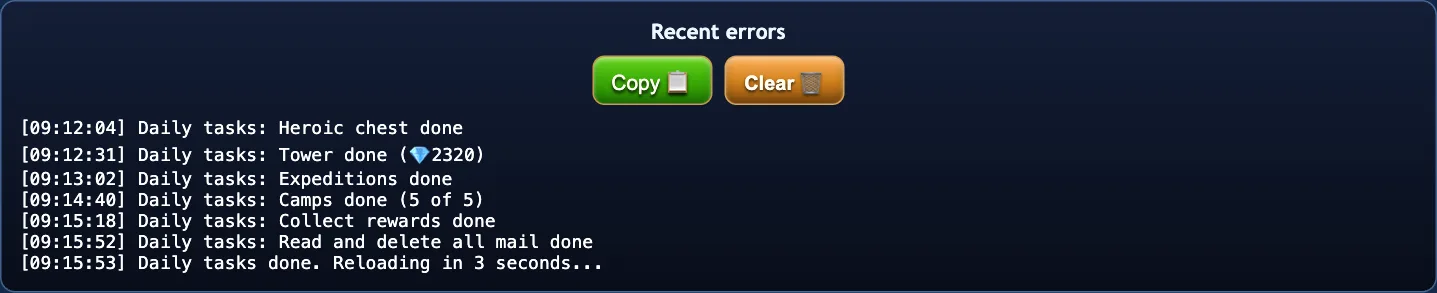
  • The toolbar shows Start/Stop, the latest log line with a copy button, and the Logs popup with recent errors, ready to paste into a bug report.
The Settings tab with logging, display, licence and remote control sections
Settings.
The PIUPIU toolbar strip with the Start button and the latest log line
The toolbar above the game.
The Logs popup listing a daily run with Copy and Clear buttons
The Logs popup.

Built to run for hours

  • If the game tab crashes or runs out of memory, the extension reloads it and resumes the run where it was.
  • A screen wake-lock keeps the tab awake during a run, and the runs by requests go on in a background tab.
  • When the licence server cannot be reached, Auto-dungeon and Auto-frontier wait for it, up to an hour, instead of stopping.
  • A near-invisible shield over the canvas stops a stray mouse move from breaking a click macro.
  • Reloads are counted by reason in the run summary.

Small footprint

  • Permissions: storage, hero-wars-alliance.com and the licence server.
  • No analytics, no tracking, no accounts. The privacy policy lists every byte that leaves your device.
  • Runs in the page itself. No popup window, no separate app to keep open.
📱 Telegram

HWA Bot: the extension, from your phone

HWA Bot is a desktop companion for Windows and macOS. It connects your own private Telegram bot to the extension, so the runs answer to your phone. Optional and free to download.

Free

A tray app with a five-minute setup

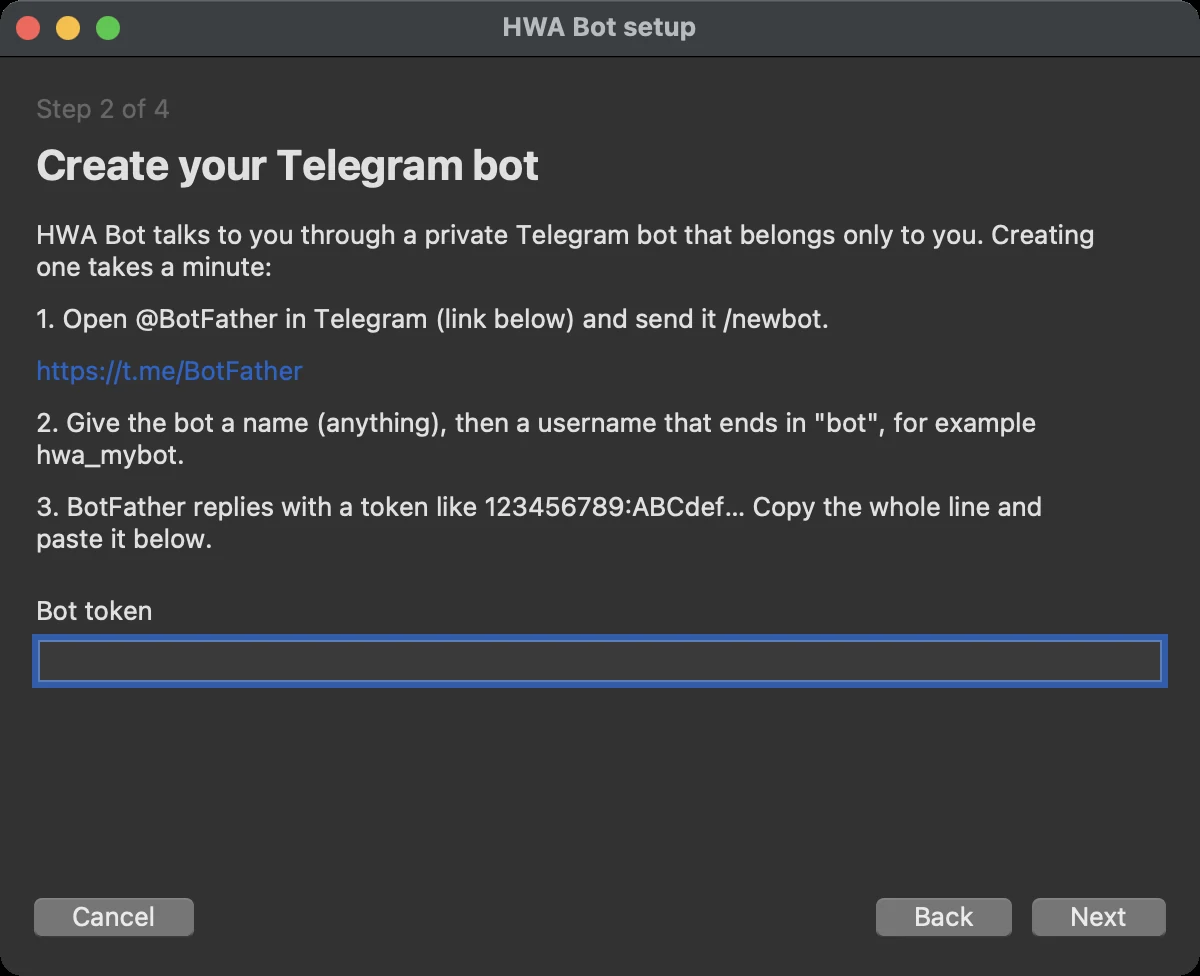
The setup wizard walks you through creating a bot with @BotFather, checks the token with Telegram and learns your Telegram id from your first message. Then it sits in the tray.

  • Tray menu: status, setup, language, start on login, check for updates, open the log folder.
  • Signed self-update: it shows the release notes and asks before installing.
  • The bot token stays on your computer and is redacted from the logs.
  • Only the one Telegram id learned during setup may send commands.
The HWA Bot setup wizard on the Create your Telegram bot page
Setup wizard, step 2 of 4.

Commands

CommandWhat it does
/startRun the Dungeon
/fstartRun the Frontier
/dailyRun the daily tasks ticked in the panel, reporting after each one
/stopStop any running macro
/train GC1-3Add teams from a war position to training
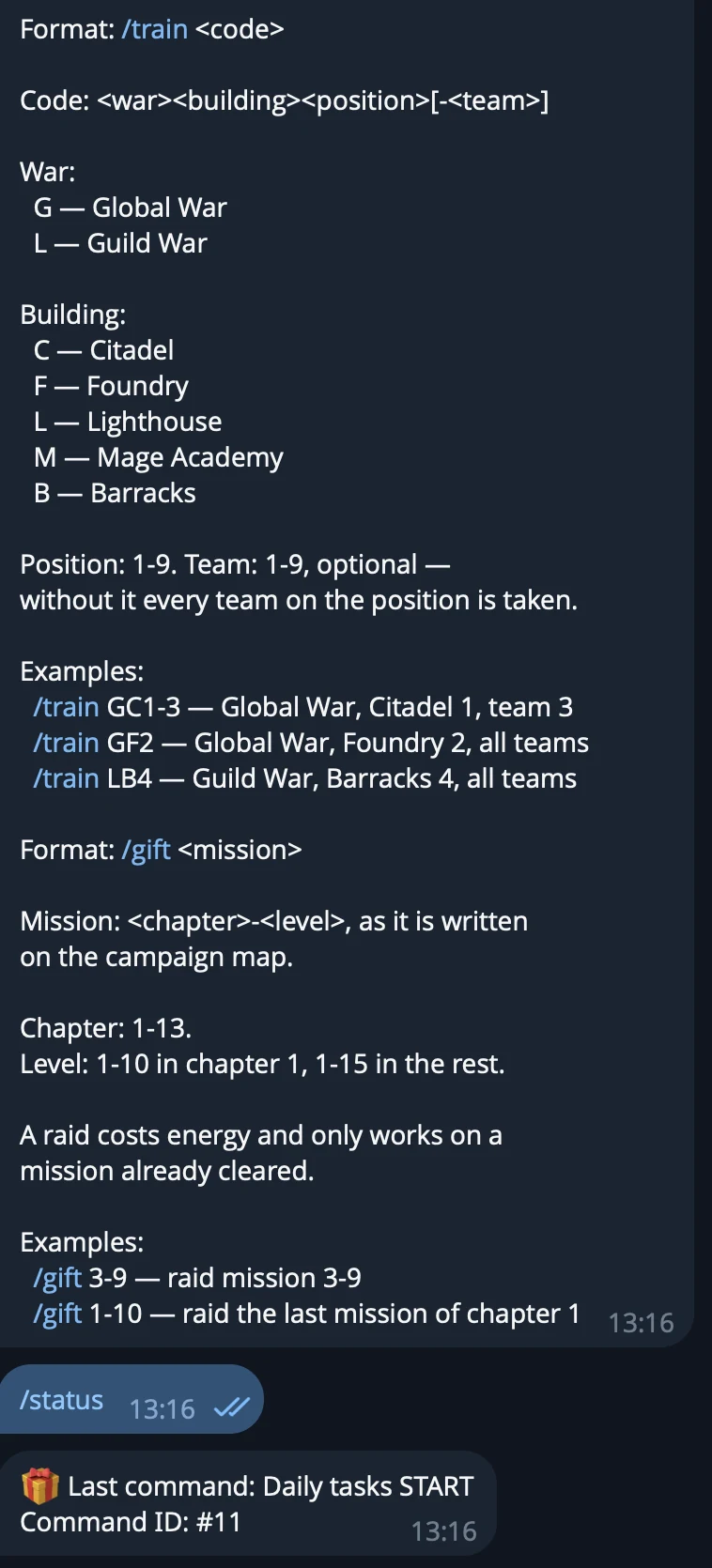
/train Aurora, Lara Croft, MiuAdd one team of exactly these heroes; names in any language
/ttrain GCAdd every unique enemy titan team of a war to training, one of them, or a lineup like 5D
/gift 3-9Raid a campaign mission
/statusCurrent Frontier level and Dungeon floor
/logsThe last 5 lines of the extension log
/reloadReload the game page; a running macro resumes after it
/helpThe list of commands with their formats

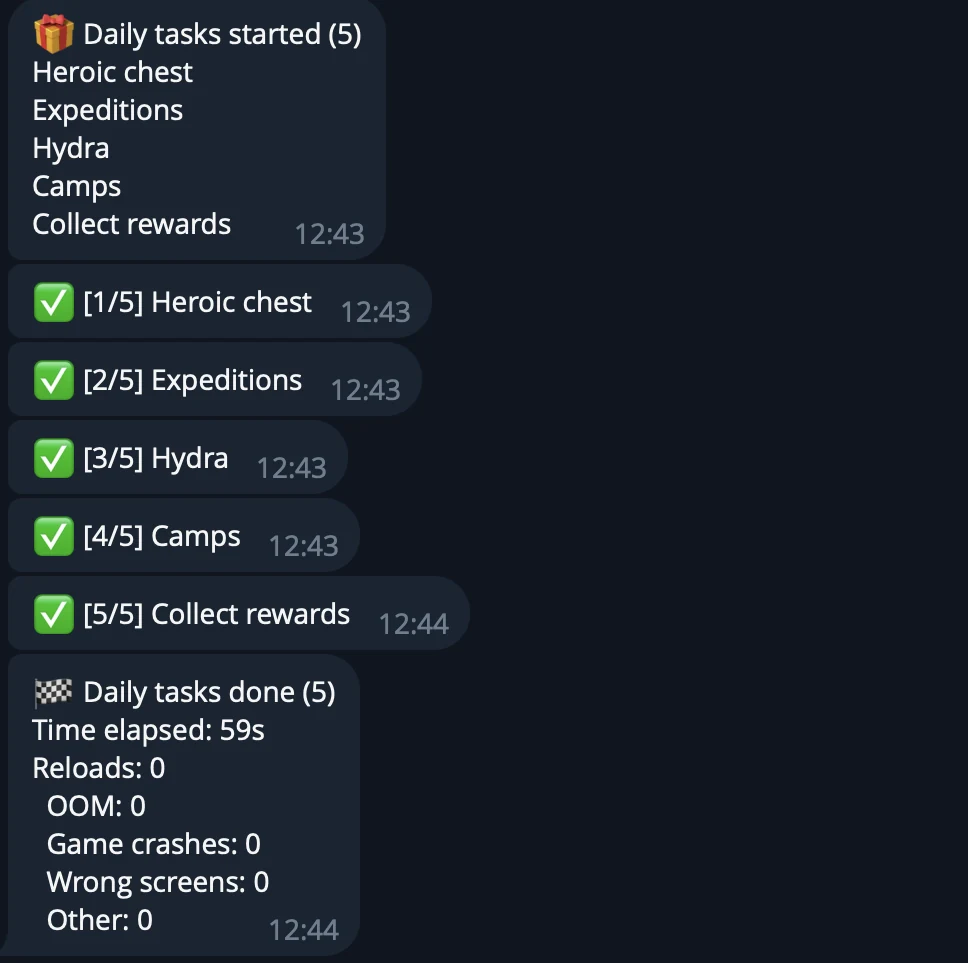
Progress comes back on its own: a line every N dungeon floors, Frontier levels and stuck-defence alerts, one tick per finished daily task, crash and reload notices. Repeats are damped, so a long run does not flood the chat.

A Telegram chat showing a daily tasks run: start line, one line per finished task, and the summary
A /daily run as it reports back.
A Telegram chat showing the reply to the /help command
The formats section of /help, and a /status reply.

Support the project

Subscribe on Patreon, or write to me.

Telegram
@int021h
Discord
discord.com/users/697746898517229673